Leo · 2026-10
An AI NAS vector database is sized by its index rather than by its documents. A float32 embedding costs 4 bytes per dimension, so 1,000,000 records at 1,536 dimensions occupy about 6.14 GB of vectors plus roughly 128 MB of graph links. Memory ceiling, not bay count, decides whether that index stays in RAM or moves to disk.

Total footprint equals the vector index plus the source corpus plus the database’s own write-ahead and snapshot files, and the index is normally the term that forces the hardware decision.
One float32 embedding costs 4 bytes per dimension, so a 768-dimension model costs 3,072 bytes per record and a 1,536-dimension model costs 6,144 bytes.
Two inputs decide the hardware: embedding dimensions and record count. The 4-byte width is a property of the numeric type rather than of any single product. The PostgreSQL numeric type documentation lists a real value as 4 bytes, and the same width applies to a float32 array written to a file or held in an index. Record count comes from the chunking policy, not from the document count: 5,000 documents split into 40 chunks each produce 200,000 records, which is the number that drives storage.
A graph index such as HNSW stores neighbor links for every record, and at 16 connections per node with 4 bytes per identifier a bidirectional link list costs about 128 bytes per record.
The HNSW paper by Malkov and Yashunin describes the layered graph and the M parameter that sets how many neighbors each node keeps. At M = 16, a record holds roughly 32 identifiers once both directions of the link list are stored, which is 128 bytes at 4 bytes per identifier, and records that also appear in upper layers hold a few more. The graph stays small next to the vectors at default settings, and M is the parameter to raise when recall falls short.
At 1,536 dimensions in float32, 1,000,000 records occupy about 6.14 GB of vectors and roughly 128 MB of graph links, so the index lands near 6.27 GB before database overhead.
| Records | float32 vectors at 1,536 dimensions | int8 vectors, same records | Graph links at M = 16 | Index total, float32 |
|---|---|---|---|---|
| 100,000 | 0.61 GB | 0.15 GB | about 13 MB | about 0.63 GB |
| 1,000,000 | 6.14 GB | 1.54 GB | about 128 MB | about 6.27 GB |
| 10,000,000 | 61.4 GB | 15.4 GB | about 1.28 GB | about 62.7 GB |
Every figure in the table recomputes from one formula: records × dimensions × bytes per value, plus records × 128 bytes for links. Swapping the embedding model to 768 dimensions halves the vector column, and quantizing to int8 divides it by four. The FAISS documentation sets out the index families and the quantization options that produce those byte counts.

A vector index served from memory needs the vector bytes, the graph, and working overhead resident at once, so a 1,000,000-record float32 index at 6.14 GB does not fit comfortably inside an 8 GB appliance.
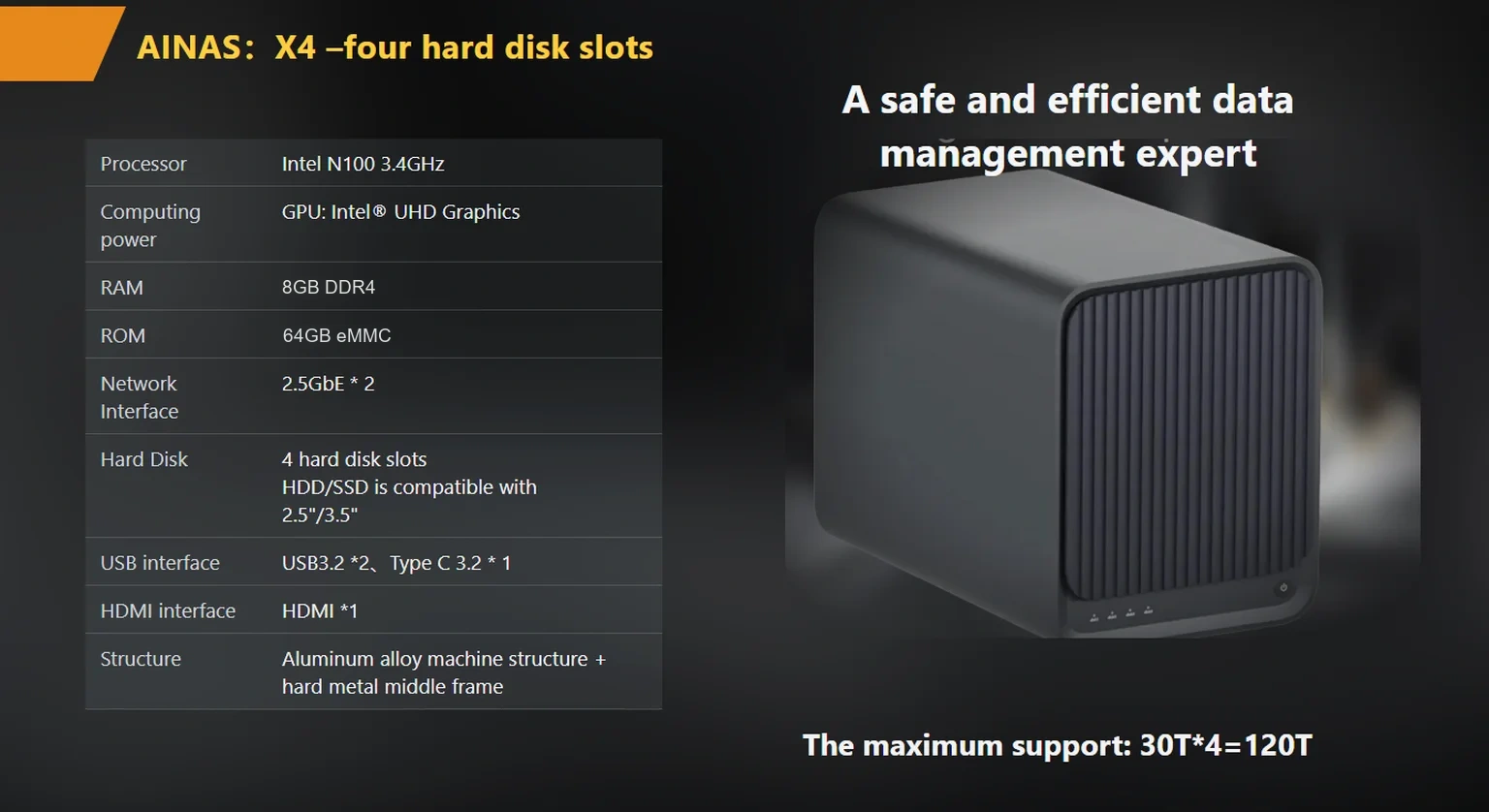
Published X4 configurations list 8 GB of DDR4 with an OEM option to 16 GB, and that memory ceiling pushes the buyer toward one of three designs: keep the index in memory with the larger OEM configuration, quantize to int8 so the same records need 1.54 GB, or serve a disk-backed index and accept higher query latency. None of the three is wrong. The common mistake is ordering by bay count first and discovering the memory ceiling after the pilot.

Source documents, page images, and model weight files are usually larger than the index in the first year, and they belong on the array rather than in the index directory.
Worked example (illustrative): 5,000 technical PDFs at an average of 2 MB occupy about 10 GB, extracted text and page thumbnails add a fraction of that, and one 7-billion-parameter model stored at 4 bits per weight occupies about 3.5 GB per copy, from 7 × 10^9 × 0.5 bytes. Corpus files grow with document count while the index grows with chunk count, so the two deserve separate forecasts. An AI NAS deployment usually keeps both on the same array, with the index on flash when query latency is part of the requirement.
Four published specifications decide whether a NAS can serve a vector workload: the memory ceiling, the processor, the network ports, and the optional cache slot.
woCyber builds the X4 as a 4-bay unit with a published 120 TB capacity ceiling, USB 3.2 and Type-C ports, HDMI 4K output, and containerized application support, which is the layer a vector database runs on. Teams that expect the working set to outgrow memory can specify an products/x4-nas-server“>X4 NAS server with the OEM NVMe option and size that cache against the hot working set rather than the whole index.
Consider a hypothetical 60-person engineering consultancy with 5,000 technical documents, an intranet search that staff already distrust, and a plan to buy a single appliance rather than a cloud contract.
At 40 chunks per document the corpus is 200,000 records: 1.23 GB of float32 vectors and about 26 MB of graph links, an index that any current appliance holds in memory without strain. The trade-off appears at growth rather than at launch. A corpus ten times larger reaches 2,000,000 records and 12.3 GB of vectors, which exceeds an 8 GB configuration once the database, the operating system, and the rebuild process are counted. The firm’s real choice is between quantizing to int8, ordering the 16 GB OEM configuration, and splitting the index across two appliances, and that choice belongs in the first purchase order rather than in the second migration.
A vector index is a derived artifact, so the backup that matters most is the source corpus plus the embedding model version and the chunking configuration.
Backing up a 6.27 GB index costs storage but shortens recovery; backing up the corpus and a configuration file costs less and survives a change of embedding model. The practical compromise is a daily corpus snapshot, a weekly index snapshot, and one full rebuild during the pilot so that recovery time becomes a measured figure rather than an assumption. Rebuild time scales with record count and processor, and the X4 publishes an Intel N100, an efficiency part rather than a high-clock server chip, so a site that rebuilds nightly should time that step before fixing the schedule.
Array layout shapes the same decision. Mirrored sets keep the index readable while a disk is replaced, parity sets trade capacity for rebuild time, and the X4 publishes RAID 0, 1, 5, 6, and 10 across four tool-less bays. A workload that rebuilds often is easier to run with the index on a mirrored set and the corpus on a larger parity volume.
Build a 10 percent subset of the real corpus, measure recall and query latency on the appliance, then extrapolate the index size with the formula above.
The pilot answers a question no datasheet can: whether the embedding model, the chunk size, and the appliance memory fit together. woCyber publishes the X4 memory options at 8 GB and 16 GB, which gives the extrapolation a real ceiling to check against. Buyers who expect the corpus to keep growing should read nas-storage-tiering-for-ai-data-a-capacity-planning-guide“>NAS storage tiering for AI data before fixing the array size, and the ai-nas-with-nvme-cache-sizing-and-spec-guide-for-2026“>NVMe cache sizing guide covers the flash side of the same decision.
The purchase order that survives a corpus which triples is the one that names the memory configuration, the index type, and the rebuild schedule in the same document. Everything else in a vector deployment can be changed later. That short list is where the negotiation belongs.
The index math stays the same, and the corpus side dominates instead, because transcripts and frame descriptions multiply the record count before any embedding is written.
One hour of meeting audio transcribed at 150 words per minute produces roughly 9,000 words, which at 250 words per chunk is about 36 records per hour. A thousand hours of recordings therefore lands near 36,000 records, a small index with a large media archive behind it. Buyers planning that mix should size the archive from the media and the index from the transcripts, then confirm that the array can hold both without moving the corpus off the appliance. The agentic-ai-workload-storage-buyer-checklist“>storage checklist for agentic AI workloads covers the mixed-media case in more detail.
woCyber AI NAS runs detection, analysis and local storage on-device — your data stays on your own hardware, with no monthly cloud fees.
Key takeaways An FCC-recognized lab must hold the right scope for your device's rule part, not just any accreditation. A 2-bay NAS…
November 3, 2026Shared storage for deskside AI clusters refers to a storage appliance on the office LAN that holds datasets, checkpoints and embeddings for…
November 3, 2026A cloud storage subscription cost is the recurring fee a business pays to keep its files on a provider's servers, billed per…
Ask our export team for the OEM/ODM cooperation guide and a written quotation.
