Leo · 2026-11
Shared storage for deskside AI clusters refers to a storage appliance on the office LAN that holds datasets, checkpoints and embeddings for a small group of GPU workstations, so the machines pull from one box instead of copying files around. It sits below the SAN tier in both price and complexity, and that gap is where most buying mistakes happen. Five checks separate a box that feeds the GPUs from one that merely stores files.

The setting has a shape you would recognize. A product team runs four GPU workstations for model experiments. Datasets live on one engineer’s external drive, checkpoints move between machines on removable media, and every retrain starts with an hour of file shuffling. Nothing is broken, exactly. It just gets slower every quarter, and the engineer with the drive has become a single point of failure with a desk key.
The fix is one shared box on the network. The catch is that a box chosen for capacity alone will disappoint, because the constraint in this scenario is almost never disk space. It is how fast four machines can read from the same place at the same time.
Three or more workstations doing training or inference under one roof, sharing no more than a few dozen terabytes of active data, and without an IT department running dedicated storage gear. That is the whole definition. It describes lab benches, agency studios and small product teams far more often than it describes data centers.
The label is worth insisting on because the failure modes are specific to the scale. At this size nobody tunes parallel filesystems, and nobody buys InfiniBand. The cluster lives or dies on one question: can a workstation read a checkpoint faster than it can recompute one? Every check below is a version of that question.
Gigabit Ethernet delivers a theoretical wire rate near 118 MB/s. Restoring a 2 TB checkpoint across that link takes a bit under five hours in the best case, before protocol overhead and competing clients. When the restore is the slow part, adding another GPU does nothing; the workstation waits on the wire, not on the math.
We have argued before that the network, not the disk array, decides whether AI storage feels fast (why-storage-is-the-ai-bottleneck), and deskside clusters are where that argument bites hardest. Verify the bandwidth claim against your own worst-case file rather than a vendor’s benchmark clip. A five-minute restore test with a real checkpoint tells you more than any spec table.

| Verify | What to measure | Common ceiling |
|---|---|---|
| Read bandwidth | Largest checkpoint restore time | 118 MB/s theoretical on 1 GbE |
| Concurrent clients | Restore time with all stations reading | Single share, single queue |
| Capacity headroom | Usable TB vs planned TB | RAID overhead forgotten |
| Protocol fit | SMB or NFS on both ends | Adapter without aggregation support |
| Growth path | Bay count and drive limits | Full chassis at year one |
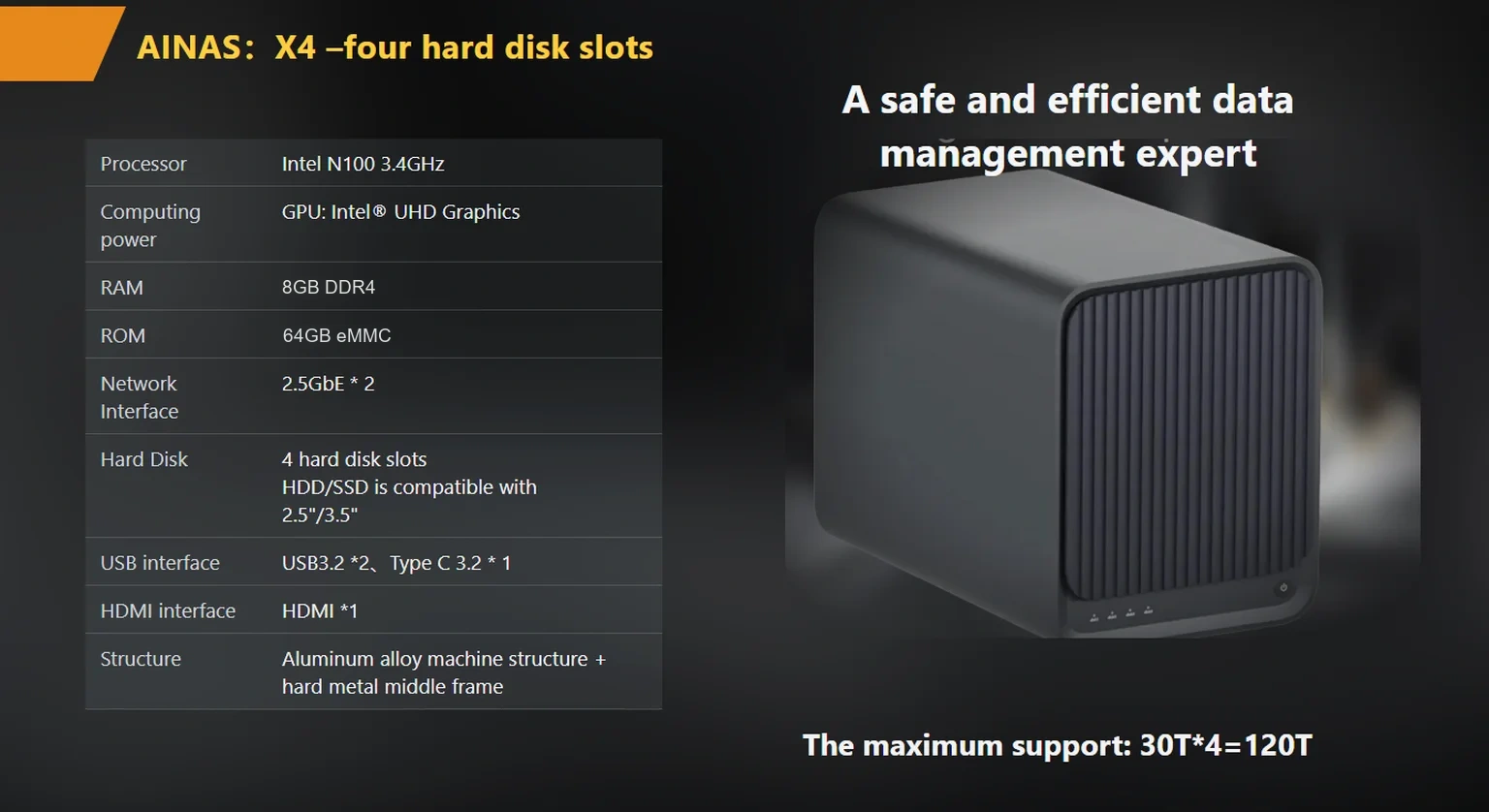
Read the spec sheet for three things: port speed, port count, and whether the ports can combine. A single 2.5GbE port lifts the theoretical ceiling to roughly 312 MB/s. Two 2.5GbE ports that support link aggregation raise it to a theoretical 5 Gbps, near 625 MB/s, and the same second port doubles as failover when one link drops. Neither figure is a throughput promise; both are division by eight, and real transfers land lower.
For buyers who need more headroom, some vendors offer 10GbE options on the same chassis. The woCyber X4, for instance, publishes 2×2.5GbE with aggregation up to 5 Gbps and lists 1GbE/2.5GbE/10GbE port mixes as an OEM configuration, worth checking early if the cluster might outgrow 2.5GbE within a year (products/x4-nas-server). Weigh the two paths with their own arithmetic rather than forum folklore (2-5gbe-vs-10gbe-business-nas-bottleneck).
On Windows networks, SMB Multichannel is what lets a single file session use multiple connections at once, and Microsoft’s documentation notes it needs multiple adapters or RSS-capable ones on both ends (source: the Microsoft Learn SMB Multichannel guide, checked November 3, 2026). Confirm the appliance speaks a protocol your workstations already use, then confirm the switch between them has the ports to match. A 5 Gbps aggregate dies quietly in a 1 GbE switch, and nobody notices until the Tuesday restore crawl.
Capacity planning for AI data has a different ratio from office storage, because checkpoints multiply everything. Run the arithmetic before buying, with illustrative figures you should substitute: a 6 TB image dataset, three checkpoint generations kept at 2 TB each, and half a terabyte of vector embeddings come to 12.5 TB of live data. Four 8 TB drives in RAID 5 yield 24 TB usable, so the array sits near half full on day one, which is where you want it. Reaching for the raw 32 TB sum instead of the 24 TB usable figure is the most common sizing error we see.
Bay count is the real constraint, not the terabyte figure printed on the box. A two-bay chassis maxes out the moment you want redundancy plus growth, and drives, not bays, are the cheap part later. The same sizing logic extends to moving older runs onto slower storage once they stop being touched (nas-storage-tiering-for-ai-data-a-capacity-planning-guide).
Deskside clusters accumulate small services: an annotation queue, a model registry, a monitoring dashboard. An appliance that supports containerized applications can host those next to the data instead of on somebody’s workstation, which removes the most fragile machine in the office from the critical path. Before ordering, verify what the container support covers, resource limits included (ai-nas-with-docker-what-buyers-should-verify-in-2026).
Plan concurrent read capacity for the training pipeline, not just for one workstation. PyTorch’s data loading guide describes prefetching and worker processes on the training side (source: the PyTorch data loading documentation, checked November 3, 2026), and every one of those workers hits the same share at once during a run. A box that benchmarks well for a single client can still queue four of them behind one another.
Published specifications settle the bandwidth and capacity questions above. The rest is vendor conversation, and it goes better with two questions written down in advance.
First, if the cluster might outgrow 2.5GbE within a year, ask whether the 10GbE option applies to your configuration and what it changes in the build; any delivery date should be confirmed in writing at order confirmation, since lead times are not a published figure. Second, if checkpoints must survive both a workstation failure and an appliance failure, ask how the vendor expects you to get an off-appliance copy, because retention and backup targets are configuration decisions, not assumptions baked into a firmware image.
For OEM buyers reselling into this exact scenario, the conversation starts one step earlier, at configuration: drive bays, port mixes and cache options are orderable choices. The published woCyber program has an MOQ of 100 units per SKU, with volume pricing quoted per project in writing, and the company runs research and development in Beijing with mass-production manufacturing in Shenzhen. Everything else on the checklist above is verifiable from the spec sheet before anyone signs, which is the point of running the checks at all.

Whether you need surveillance storage, private cloud for business data or an OEM/ODM partner, our export team will map the right platform to your application — reply within one working day.
Key takeaways An FCC-recognized lab must hold the right scope for your device's rule part, not just any accreditation. A 2-bay NAS…
November 3, 2026A cloud storage subscription cost is the recurring fee a business pays to keep its files on a provider's servers, billed per…
October 30, 2026NVMe in a Business NAS: Cache Pool or Storage Volume? NVMe in a business NAS means using M.2 or U.2 flash drives…
Ask our export team for the OEM/ODM cooperation guide and a written quotation.
