Leo · 2026-10
An AI NAS with NVMe cache is a network storage appliance that keeps its spinning disks for capacity and uses a fast solid-state slot for the data a model reads repeatedly. It is worth specifying when the same small records get requested over and over, and it is wasted money when they do not.
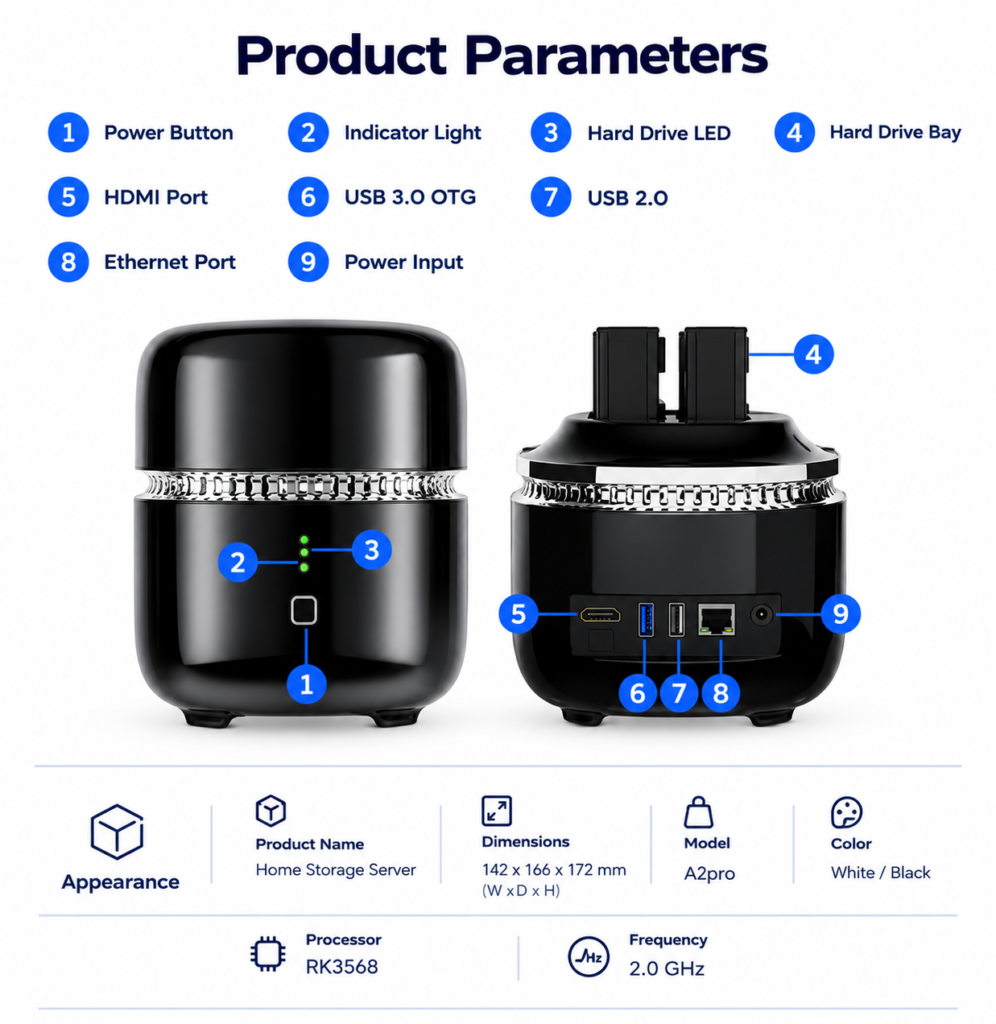
The cache does not make the array bigger. It shortens the wait when software asks for the same small pieces over and over.
This guide is for the person writing the specification: the integrator, the IT lead, or the product manager deciding whether an NVMe cache slot earns its place in the bill of materials.
The question worth answering is not whether NVMe is faster. It is, and that part is settled.
What is not settled is whether your workload repeats its reads often enough to notice. We manufacture on both sides of that line, so this guide spends as much time on the cases where the answer is no.
Three layers of storage can sit inside one appliance, and they are not interchangeable.
The hard drive bays hold the archive. The boot storage holds the system image. The NVMe slot, when it is fitted, holds whatever the software touches most often.
Reads that hit the cache come back in microseconds rather than milliseconds. Reads that miss still travel to the disks.
That distinction sets the size of the prize. A cache with a 90 percent hit rate removes most of the latency for the popular slice of your data. The same cache with a 20 percent hit rate mostly adds cost and another component to monitor.
Hit rate is not a specification you can buy. It falls out of the ratio between cache size and the working set, which is the part of the dataset actually in active use.
Workloads that read small records randomly tend to benefit most. Workloads that stream long files sequentially tend to benefit least.
Vector search sits at the favourable end. An approximate nearest neighbour index is read in fragments, and the same clusters of vectors get requested repeatedly as users run similar queries.
Photo and document libraries sit in the middle. Thumbnail generation and OCR passes walk the same metadata records again and again, which rewards a cache, while the original files themselves stream past once.
Large sequential transfers sit at the other end. Copying a 40 GB video project to the array reads each block once, so a cache holds nothing worth keeping.
Streaming media playback behaves the same way in most deployments, because each film is read once, in order, and then not touched again for weeks.
Backup windows follow the same logic. A nightly incremental is largely sequential, and the cache will not shorten it much.
It adds to it, and the order of the two upgrades is worth getting right.
Memory and cache solve different halves of the same problem. Memory keeps index structures and metadata resident so the software never asks the disks for them. Cache keeps frequently read blocks close so repeated requests return quickly.
On the published X4 specification, base memory is 4 GB DDR4 with OEM configurations up to 16 GB. An index that fits in memory serves lookups without touching either storage tier.
Our reading of the trade-off is straightforward. A larger cache helps when the working set exceeds memory but repeats heavily. More memory helps when the working set fits but the index keeps getting evicted.
Measure which of those two describes your deployment before you order either option. The measurement is a working-set estimate and a look at the software’s own statistics, not a benchmark.
The same NVMe slot can serve three different jobs, and mixing them up is how specifications go wrong.
The third job changes your backup plan, because data that exists only on the fast tier is data with no second copy.
Ask the supplier which of the three the firmware implements, and get the answer in writing. A slot listed as an OEM option does not by itself tell you what the software does with it.
woCyber lists the NVMe cache slot as an OEM configuration option on the X4 rather than a standard fitting, so the behaviour worth confirming is the behaviour of the firmware build you receive.
Size the cache against the working set, not against the array.
Two arithmetic steps cover most cases. The first estimates the live index or hot dataset. The second adds room for index overhead and metadata.
Take a text embedding store held in 768 dimensions as an illustrative case. Each vector occupies 768 x 4 bytes = 3,072 bytes. Two million vectors occupy 2,000,000 x 3,072 = 6,144,000,000 bytes, or roughly 6.1 GB before overhead.
A practical allowance for index structures adds 15 percent. That percentage is an assumed input rather than a measured figure, and it brings the working set to about 7 GB.
Now do the same for the file side. A library of 400,000 documents carries metadata that most systems keep in memory or on the fast tier. Assume roughly 4 KB per record as a second illustrative input, and the arithmetic is 400,000 x 4 KB = 1,600,000 KB, or 1.6 GB.
Add the two and the hot working set lands near 8.6 GB. That is the number to specify against, with the caveat that both inputs are your own estimates rather than measured values.
If the estimate exceeds what you are willing to spend, the sane response is to shrink the working set. Rebuild the index over a narrower slice of content instead of buying a bigger solid-state drive to hold an index nobody queries.

The table below compares published X4 specifications from woCyber rather than marketing tiers.
| Change | What it relieves | Where it does little | Published status |
|---|---|---|---|
| NVMe cache slot | Repeated small reads, index lookups, thumbnail work | Sequential copies and nightly incrementals | Published OEM option on the X4 |
| Second 2.5GbE link | Concurrent client access across one switch | A single backup job from one host | Standard on the X4, two ports |
| Link aggregation to 5 Gbps | Aggregate throughput across several clients | Any single client session | Published as a marketed ceiling, theoretical |
| 10GbE port mixing | Studios already running a 10GbE fabric | A gigabit-only network | Published OEM option on the X4 |
| OEM memory to 16 GB | Index and metadata resident in RAM | Disk-bound streaming workloads | Published OEM configuration |
Bandwidth numbers in that table describe the theoretical ceiling of the link, not a measured transfer rate. The published marketing figure for the X4 is an aggregation ceiling of up to 5 Gbps across two 2.5GbE ports.
Link aggregation itself follows the rule set published in IEEE 802.3, which is where an integrator can check how traffic is distributed across member links. ([Source: IEEE 802.3, https://ieee802.org/3/, queried October 16, 2026.])
For the slot itself, the governing document is the NVMe specification set published by NVM Express, which defines the command set and queue depth behaviour your software will rely on. ([Source: NVM Express, https://nvmexpress.org/specifications/, queried October 16, 2026.])
Buy the network before you buy the cache. That is the order we would recommend, and it runs against the way most specification sheets are written.
Bays and drive capacity dominate the conversation because they are easy to compare. Network ports are one line on a sheet and rarely carry a price tag during evaluation.
Yet a cache only helps the requests that arrive at the appliance. When several editors pull from the same array at once, the single gigabit link becomes the queue, and a faster cache behind a saturated link changes very little.
Two 2.5GbE ports with aggregation address that directly. The cache addresses the next bottleneck after it.
If the budget covers only one optional item this cycle, take the port. If it covers two, take the cache slot as well, then size it against the arithmetic in the earlier section.
Vague requirements produce vague quotes, and storage quotes are expensive to reopen once tooling and packaging are underway.
Two of those items interact. Hardware 4K transcoding and an AI index workload both consume the same processor, and the published X4 uses an Intel N100 with hardware transcoding support. If both run at once, load planning belongs in the specification.
We also ask buyers to state the working-set estimate in gigabytes rather than describing it as a lot of data, because that one number decides whether we quote a cache slot at all.
Brands launching a product line can leave that engineering work with the manufacturer through an OEM program. That is the route described in ai-nas-oem-guide, including which configuration choices sit with the buyer and which we hold.
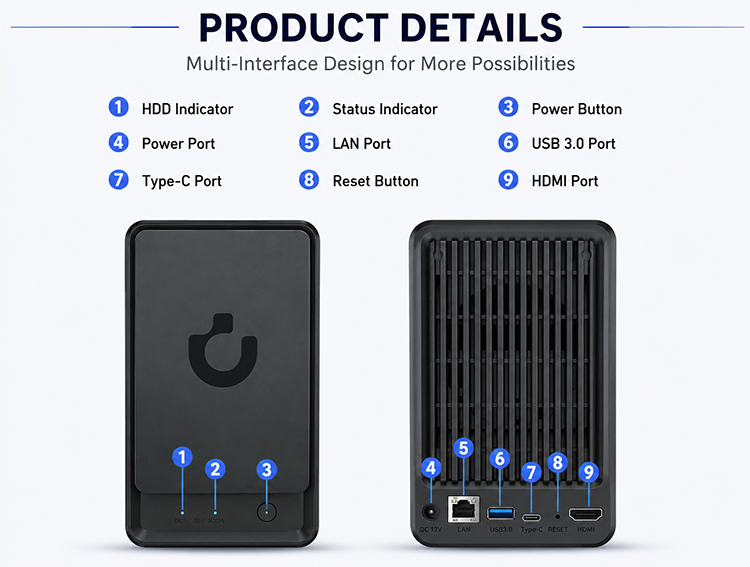
For deployments where the array is bought outright rather than bundled, products/x4-nas-server lists the published options in the same terms we used above, including the NVMe cache slot, the OEM memory configurations, and the 10GbE port mixing option.
Ask what happens to the cache when power fails. Write caches without protection can lose the most recent writes, and that answer belongs in the design record rather than in a support thread.
Then ask whether the fast tier is included in backup and snapshot policy. A working set that lives only on the solid-state slot is a single copy of data, whatever the array behind it reports.
Buyers comparing models usually also want to see how a cache decision interacts with transcoding and with cloud alternatives, and the checklists in ai-nas-with-hardware-transcoding-buyer-checklist and ai-nas-vs-cloud-storage-small-business cover those two questions in the same practical register.
Both checks cost one email to us. Getting the answers wrong costs a rebuild.

woCyber AI NAS runs detection, analysis and local storage on-device — your data stays on your own hardware, with no monthly cloud fees.
Key takeaways An FCC-recognized lab must hold the right scope for your device's rule part, not just any accreditation. A 2-bay NAS…
November 3, 2026Shared storage for deskside AI clusters refers to a storage appliance on the office LAN that holds datasets, checkpoints and embeddings for…
November 3, 2026A cloud storage subscription cost is the recurring fee a business pays to keep its files on a provider's servers, billed per…
Ask our export team for the OEM/ODM cooperation guide and a written quotation.
