Leo · 2026-11
A cloud storage subscription cost is the recurring fee a business pays to keep its files on a provider’s servers, billed per user, per terabyte, or both. The sticker price rarely decides anything on its own. The deciding number is what the same workload would cost on hardware you own, and how many months of fees buy that hardware outright.

This piece is procurement math, not a platform review. We walk through what a subscription line item actually covers, run a per-terabyte calculation you can replicate, and compute a break-even point against a local appliance. Substitute your own quotes where we mark them, and the comparison turns into arithmetic instead of taste.
Most business plans bundle storage with a software suite. As of November 3, 2026, Google’s own Business editions overview on support.google.com lists Business Starter at $7 per user per month on the annual plan ($8.40 flexible), with 30 GB of pooled storage per user alongside email, video meetings and document editing. The same page lists Business Standard at $14 per user per month with 2 TB pooled per user. These are Google’s published rates, re-checkable at the link at any time.
Bundling cuts both ways. If your team lives in those apps all day, the storage ride-along is nearly free. If you only need capacity for a shared archive, you are paying for meeting rooms nobody books.
There is a structural detail worth noticing. Per-user pricing scales with headcount. Per-terabyte pricing scales with data. A five-person firm whose archive grows every quarter feels the second axis first, and no seat count captures it. When you compare plans, separate the two axes deliberately: how many people, and how many terabytes. Most statements merge them into one number that answers neither question. Some suites also price the first seat differently from the rest, and a promotional first-year rate can reset once its window closes.

Object storage is the cleaner reference point for capacity-heavy workloads because it bills by volume. Backblaze’s published B2 pricing page showed, as of November 3, 2026, a starting rate of $6.95 per TB per month, with free egress up to 3x stored data and $0.01 per GB beyond that. The rate is Backblaze’s own published figure and the page can be re-checked at the link.
Run one workload through it. Twelve terabytes at $6.95:
12 TB × $6.95 = $83.40 per month, or $1,000.80 per year.
Three years of that bill totals $3,002.40 if the rate holds. Whether it holds is a contract question: multi-year commitments may trade price certainty for a commitment term, while month-to-month pricing can change with a notice period. Read which one you are signing before the anniversary date decides for you.
Egress is the line that surprises people. Free retrieval up to 3x your stored monthly average sounds generous until a migration or an audit pulls the whole archive out at once, and the overage meter runs at the published $0.01 per GB. Ask how the provider counts “average stored” before signing, because a month with a large temporary upload can reset that baseline against you. The broader mechanics of retrieval billing are worth an hour of reading before any multi-year signature (cost-of-data-egress-from-cloud-business-nas).
| Cost line | Cloud subscription | Local appliance |
|---|---|---|
| Upfront spend | None | Appliance plus drives, one time |
| Monthly spend | Per user and/or per TB | Electricity only |
| Adding a user | Another seat price | No cost |
| Adding capacity | Tier upgrade or add-on | Add or swap drives within the bay count |
| Retrieval | Egress rules and overage rates | No meter on the LAN |
| Exit | Migrate out, egress may bill | Data is already in the building |
Consider a hypothetical 12-person accounting firm, and treat every number here as an assumption for the arithmetic rather than a survey finding. Clients deliver scanned returns and statements all year, the archive swells through filing season, and a partner wants last spring’s working papers retrieved by Monday. The firm’s planning assumptions might read: 9 TB of files today, roughly 2 TB added per year, twelve seats on a $14 per-user plan. Year three starts near 13 TB.
Headcount never changes, so per-user pricing ignores the growth entirely. Data volume is the axis that moves, and on pooled plans it surfaces as a tier upgrade, a storage add-on purchase, or a forced move to a higher edition. Each of those resets the negotiation from zero, usually at renewal, when the alternative to signing is being without service in the middle of tax season. That is the quiet asymmetry of the model: your archive compounds, and a seat is a seat.
The same firm would also discover that a collaboration suite is not a backup. Version history and trash folders are retention features, not backups, and the distinction has its own arithmetic (raid-is-not-backup-3-2-1-plan-small-business-storage).
Here is the formula we use, and it fits on one line:
Break-even months = (appliance price + drive cost) ÷ (monthly subscription bill for the same capacity − estimated monthly running cost)
Take the same 12 TB workload billing $83.40 per month at object-storage rates, against a two-bay desktop appliance at the published $195 retail price. Add two 8 TB drives at your own drive quote, because drive prices move quarterly and ours would go stale. Running cost has no published figure to look up, so treat it as a pure assumption of your own, built from your local utility rate and whatever power draw applies to the unit you choose. To keep the example honest, we leave running cost out of the divisor entirely and let it work against the appliance:
If the drive quote lands at $300, then ($195 + $300) ÷ $83.40 ≈ 5.9 months before any running cost is counted. At $500 for the pair it is ($195 + $500) ÷ $83.40 ≈ 8.3 months. Real electricity stretches both results slightly, which is the conservative direction for a comparison like this. Both figures are illustrative arithmetic on stated variables, not a market claim.
Two honest caveats belong next to that result. First, the calculation ignores your time: someone owns updates, drive health checks and the backup schedule. Second, the subscription buys real things, geographic redundancy and zero maintenance among them, and pretending otherwise is how procurement teams get surprised. Our editorial line: if the whole archive fits on one laptop, close the tab and pay the seat price. The math only turns when multi-terabyte working sets, several users and retrieval fees stack on the same bill, which is precisely the profile the accounting firm above grew into.
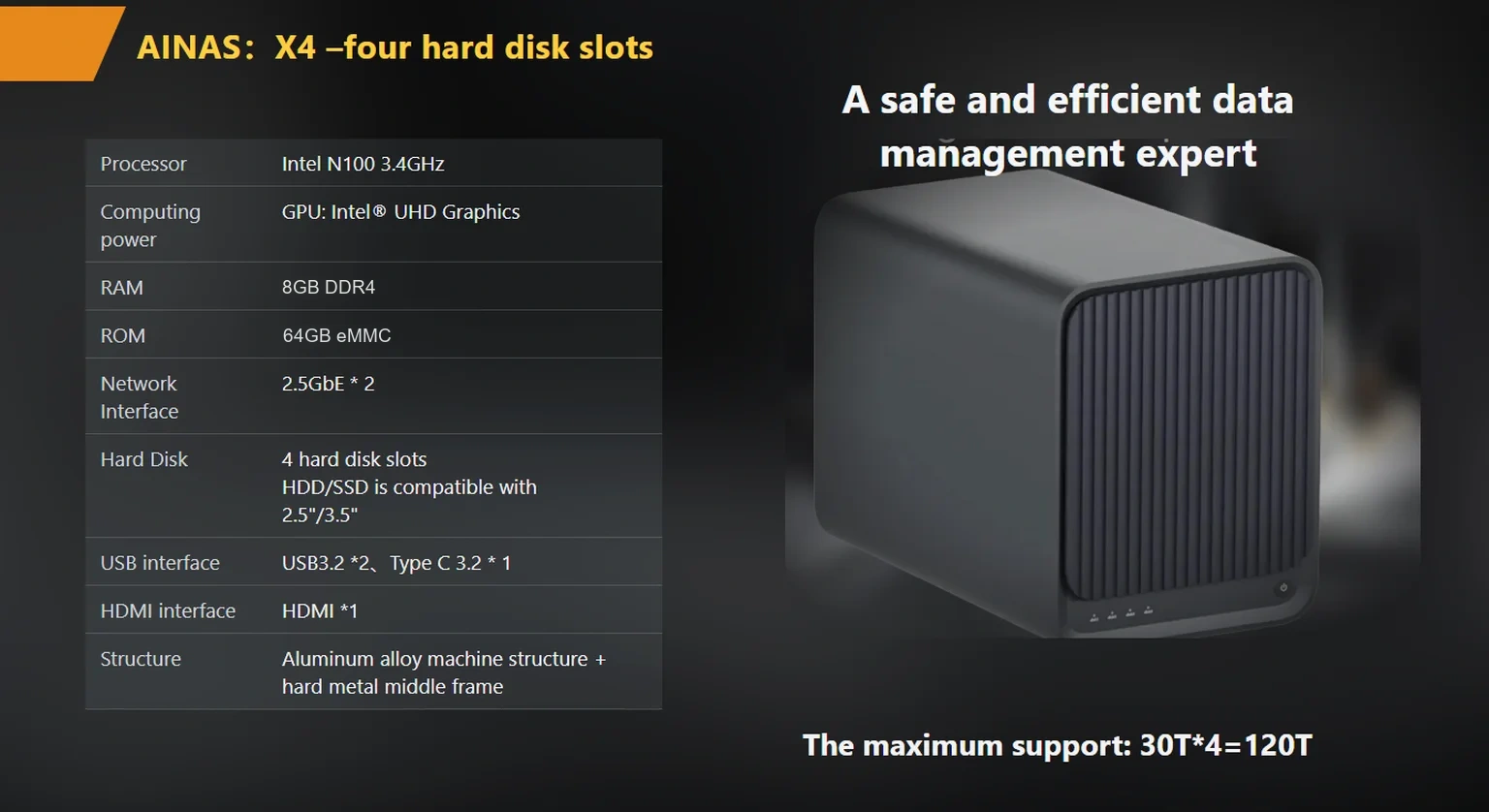
A local appliance converts the recurring bill into a one-time purchase plus electricity, and capacity becomes a drive decision instead of a plan decision. Sizing one starts with published specifications rather than marketing pages. The woCyber S2 lists two bays, a published 60 TB capacity ceiling, one 2.5GbE port and a steel internal frame at a published $195 (products/s2-smart-nas). When the archive outgrows two bays, the X4 carries four bays, a published 120 TB ceiling and two 2.5GbE ports that can aggregate to a theoretical 5 Gbps, at a published $400 (products/x4-nas-server). Volume and OEM pricing for both is confirmed per project in writing.
The ledger has a debit side too. You own the backup discipline, the drive spares and the answer to “why is the share slow on Fridays”, which is a networking question more often than a storage one (how-to-budget-for-on-premise-storage). Retrieval economics flip in your favor, though: data on your LAN moves at LAN speed with no per-gigabyte meter, so the egress line that subscriptions bury in footnote language simply disappears.
Budgeting for the switch is its own exercise, and it works better bottom-up than top-down. Price the appliance, price the drives at this quarter’s quotes, then compare the total against twelve months of actual bills rather than against the advertised rate.
Renewal season is the cheapest moment to re-run the numbers, because that is when your leverage actually exists. Pull three figures: twelve months of bills including overages, the current archive size with a year of growth, and one appliance-plus-drives quote from a supplier. Compute the same break-even we did above, then decide.
Cloud storage subscription cost comparisons are easy to rig in either direction, which is why we keep coming back to the formula. If your result is under a year, the conversation with whoever signs the checks writes itself. If it stretches past three years, stay subscribed and revisit next cycle; the switching guides catalog the fatigue of perpetual rental well enough (monthly-subscription-fatigue-the-buyout-nas-option), but fatigue is an argument and math is a decision.
Certification paperwork belongs in the same comparison, since import and resale both depend on it: the published certification set for the woCyber product lines covers CE, UKCA, FCC, RoHS, REACH, and WEEE. Both appliances’ published spec sheets carry the same figures used above, so the renewal conversation can start from a document rather than a claim, and the drive quotes you gather this quarter will keep the arithmetic honest.

Whether you need surveillance storage, private cloud for business data or an OEM/ODM partner, our export team will map the right platform to your application — reply within one working day.
Key takeaways An FCC-recognized lab must hold the right scope for your device's rule part, not just any accreditation. A 2-bay NAS…
November 3, 2026Shared storage for deskside AI clusters refers to a storage appliance on the office LAN that holds datasets, checkpoints and embeddings for…
October 30, 2026NVMe in a Business NAS: Cache Pool or Storage Volume? NVMe in a business NAS means using M.2 or U.2 flash drives…
Ask our export team for the OEM/ODM cooperation guide and a written quotation.
