Leo · 2026-11
A NAS with HDMI output for direct media playback sends the video signal straight to a television, so no streaming stick, games console, or second computer sits in the path. The trade-off is control: the appliance needs a local player interface, a remote or keyboard, and codec support that matches the library.

The phrase NAS with HDMI output for direct media playback describes a storage appliance whose video port drives a display while its player software decodes the file locally. It matters to households and small screening rooms where one device should both store and play, and to buyers tired of a client box that needs an update every month.
It carries whatever the on-device player renders: the file, decoded on the appliance, output as a video signal at a resolution and refresh rate the display accepts.
That distinction matters because a NAS can also stream without any HDMI port at all. In the streaming case, the file travels over the network and a client device decodes it. With direct output, decoding happens on the appliance and the network is not involved in playback. The two paths fail in different ways: streaming fails when the network stutters, and direct output fails when the player cannot decode a codec.
Published specifications matter here. The X4 from woCyber lists HDMI output at 4K at 60 Hz, 4096 × 2160, and the A3 Pro lists the same figure; neither listing names the HDMI revision, so a buyer who needs a specific feature set should request it in writing rather than infer it.
| Question | Direct HDMI output | Transcoded network streaming |
|---|---|---|
| Where decoding happens | On the appliance | On the client device or the appliance |
| Devices supported at once | One display per port | Several, limited by transcoding capacity |
| Control method | Remote, keyboard, or phone app | The client device’s own interface |
| Audio path | Direct to the receiver over HDMI | Depends on the client’s support |
| Failure mode | Codec or player limitation | Network congestion or client limits |
A room with one large screen and a receiver is the natural fit for direct output. A household where four people watch different things at the same time is not, because one port drives one display. Most homes end up with both: direct output in the main room, streaming to tablets and bedroom sets.
Large enough that drive count, not the player, becomes the deciding purchase. Work it out with the file sizes actually in hand.
Take a hypothetical library of 100 films at 4K resolution averaging 60 GB each, plus 20 series seasons at 150 GB per season. Films are 100 × 60 = 6,000 GB, or 6 TB. Seasons add 20 × 150 = 3,000 GB, or 3 TB. The library totals 9 TB before any personal video, and a household that also keeps phone footage and photos should add a terabyte or two.
On a four-bay array with four 8 TB drives in RAID 5, usable capacity is 24 TB, so a 9 TB library uses 37.5 percent of the array. Three drives would give 16 TB usable and still fit, but a four-drive volume leaves room to grow without rebuilding. That is the arithmetic worth doing before choosing between a two-bay and a four-bay platform, because the second bay is cheap until the library outgrows it.
A 4K file at 60 Mbps needs 60 Mbps of steady throughput to stream without buffering, which is 7.5 MB/s. Three concurrent viewers need 22.5 MB/s, comfortably inside a 1GbE link that delivers about 110 MB/s at 88 percent of line rate, a planning assumption rather than a measured figure.
Transcoding changes the arithmetic on the outbound side but not on the disk side. Decoding a 60 Mbps 4K source and re-encoding it at 8 Mbps for a tablet still reads 60 Mbps from disk; only the network output drops. Three simultaneous transcodes therefore read 180 Mbps from the array, which is far below the sequential read capability of a single modern drive, while the appliance’s processor carries the encoding load. Hardware transcoding support is the property to confirm, because software transcoding on a low-power processor runs out of headroom at two or three streams.
Codec support is documented in the standards: ITU-T H.264 remains the most widely supported format for older clients, and HDMI Licensing Administrator publishes the interface specifications, both checked November 18, 2026.
Lossless surround formats and image-based subtitles, in that order. Both depend on what the player and the display chain support, and neither is fixed by the storage hardware.
Ask three questions before relying on direct output. Does the player pass the audio format untouched, or decode and downmix it? Can the display or receiver accept that format? Do image-based subtitles render, or only text-based ones? A library heavy on remuxed discs will hit all three.
The workaround is well established: keep the direct-output room for content that plays cleanly, and let the client path handle the rest. That is not a compromise, it is the normal split in a household with mixed devices.
Through hardware transcoding, which converts a heavy source into a lighter stream for tablets, phones, and remote viewers.
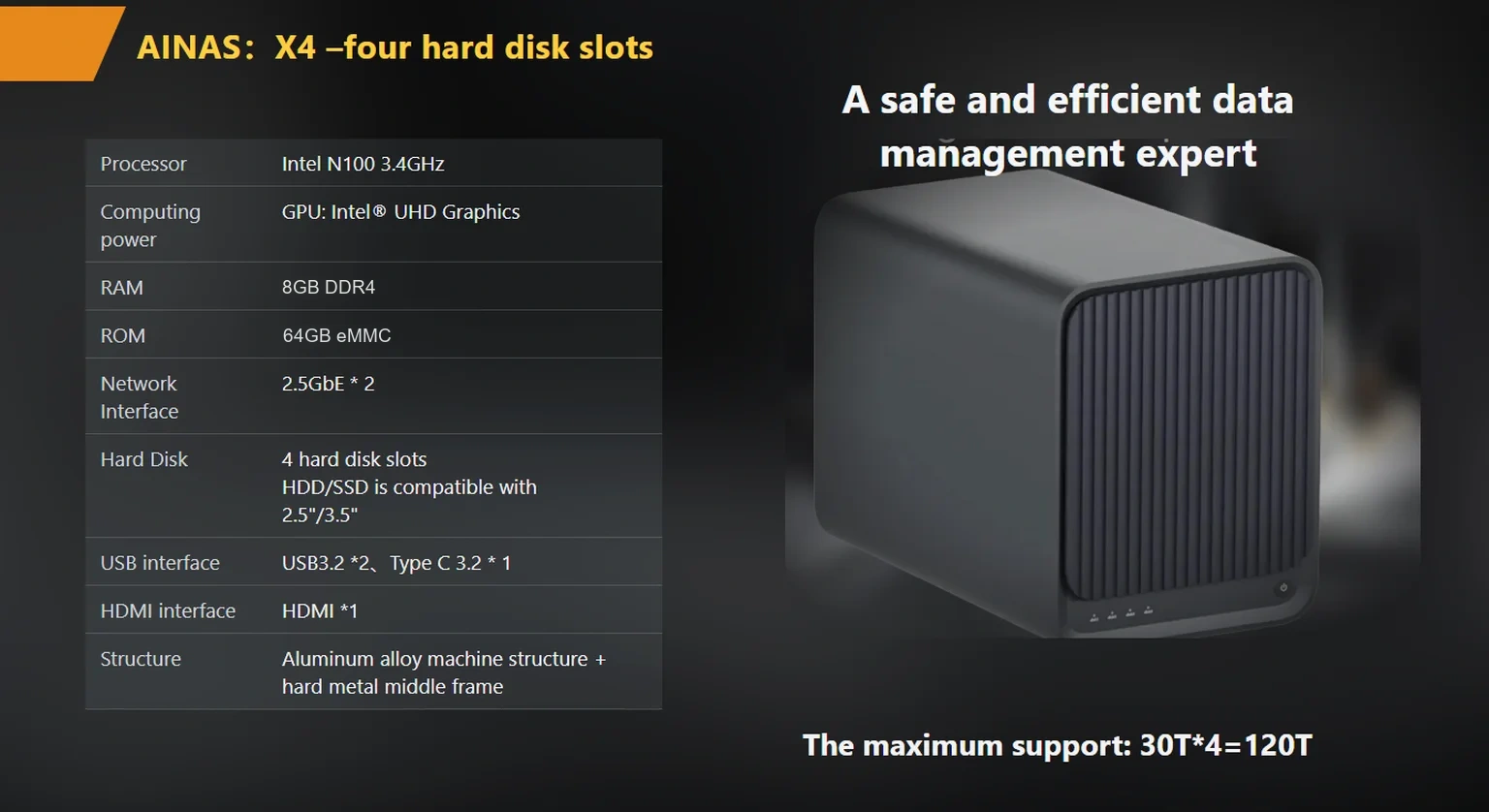
The X4 from woCyber, an export brand of a Beijing-based storage hardware manufacturer, publishes hardware 4K transcoding alongside its HDMI output, an Intel N100 processor, four bays, a 120 TB capacity ceiling, two 2.5GbE ports that aggregate to 5 Gbps, RAID 0/1/5/6/10, and an OEM NVMe cache option. The combination covers both paths in one chassis: HDMI into the main room’s receiver, and transcoded streams to everything else. The products/x4-nas-server page lists the full published specification, and the products hub compares it with the single-bay A3 Pro, which publishes 4K at 60 Hz HDMI output, one bay, and a 30 TB ceiling for a smaller footprint.
Buyers who only ever watch in one room should price the smaller platform first. Buyers who expect a second screen, a tablet habit, or a growing library should start at four bays, because adding drives later is cheap while rebuilding a volume is not.
Four checks in the first hour: signal at 4K 60 Hz, audio passthrough, subtitle rendering, and one transcode to a phone.
Connect the display directly and confirm the player reports the expected resolution and refresh rate rather than falling back to 1080p. Play a file with the surround format the household actually uses and confirm the receiver shows that format rather than stereo. Load a subtitle track from a disc remux and confirm it appears at the right size. Then start a transcode to a phone while the display is playing, which is the load pattern that exposes a processor without headroom.
Interface polish and remote control, mostly. A storage appliance’s player is built by a storage company, and its browsing experience reflects that priority.
Library organization decides how often anyone touches the appliance after setup. A flat folder works for twenty files and collapses at five hundred, so the library needs a naming rule before the first file lands: a folder per title, one convention for resolution and edition, and a single place for subtitle files. A player indexes whatever structure it finds, and a structure built for a media manager is easier to feed than one built for a file browser. Filenames carrying title, year, and edition are readable by both a person and an indexer; abbreviated names are readable only by the person who wrote them. Households migrating an existing library should normalize names during the copy, while the files are moving anyway, instead of scheduling a second pass later. Two weeks of watching an unnormalized library usually settles the argument about which part of the migration was valuable.
Expect a functional library grid rather than a curated interface with trailers and recommendations, and expect to supply a remote, a keyboard, or a phone app rather than a purpose-built pointer. For a screening room where one person starts a film, that is fine. For a household where children navigate alone, a dedicated client device usually wins on usability even though it adds a box.
The honest summary: direct output is the right answer when the goal is one screen, one library, and one device to maintain. It is the wrong answer when the goal is a polished interface on five screens. Most buyers discover which of those they wanted only after living with the setup, which is why the first purchase should leave a bay free.
woCyber builds OEM and ODM storage hardware with research and development in Beijing and mass-production manufacturing in Shenzhen, publishes CE, UKCA, FCC, RoHS, REACH, and WEEE documentation for its product lines, and quotes reconfiguration projects from 100 units per SKU. Households planning a larger library can work through the 4-bay-nas-for-home-media-streaming-2026-buyer-s-guide buying guide and the best-4-bay-nas-for-4k-transcoding-2026-hardware-checklist transcoding checklist, or read the nas-for-large-movie-and-tv-library-storage-2026-guide notes on very large libraries.


Whether you need surveillance storage, private cloud for business data or an OEM/ODM partner, our export team will map the right platform to your application — reply within one working day.
 Browse all platforms →
Branding starts last on a multi camera AI NVR OEM platform, not first. The order that holds up: camera count in writing,…
November 19, 2026NAS sourcing for US importers lives or dies on documentation: the certification file, the shipping paperwork, and the commercial terms confirmed in…
November 19, 2026A self-hosted cloud appliance keeps your files on hardware you own and still serves them to every device you use. This verification…
Ask our export team for the OEM/ODM cooperation guide and a written quotation.
