Leo · 2026-10
The best 4-bay NAS for 4K transcoding 2026 buyers should shortlist is the one whose datasheet names the video engine, the codecs that engine accelerates and the port that feeds it. Four bays hold the library; the transcode path decides whether the library actually plays.

4K transcoding requires a dedicated video engine that decodes a 4K source and re-encodes it at a resolution or bitrate the client can accept, plus storage and network throughput that keep pace with that stream. General-purpose CPU cores can transcode video. Every core spent on encoding, however, is a core removed from file serving, indexing and backup jobs.
The Jellyfin hardware acceleration documentation lists Intel Quick Sync among the acceleration methods it validates and notes that partial acceleration raises CPU usage, which is the distinction a datasheet should make explicit.
Two lines in a specification separate a real transcode path from a resolution badge. The first is the processor model, because the video engine ships inside the SoC. The second is an explicit statement that hardware transcoding is included.
“4K output” describes the HDMI connector. “Hardware 4K transcoding” describes silicon that re-encodes video without handing the work to the CPU. Buyers merge those two claims constantly, and the merge is where purchase mistakes start.
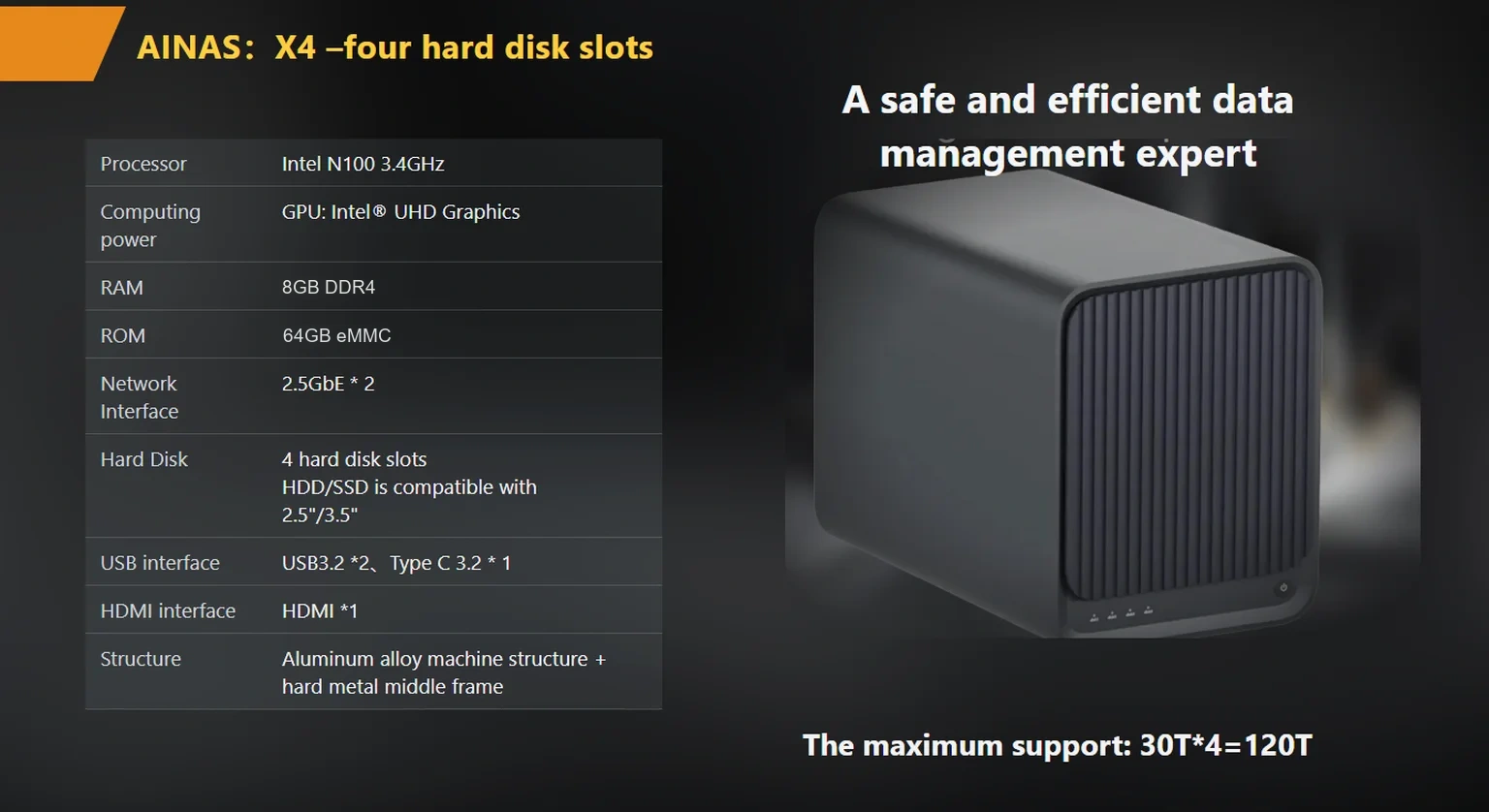
The published X4 specification from woCyber, an export brand of a Beijing-based storage hardware manufacturer, lists an Intel N100 processor, hardware 4K transcoding and HDMI output at 4K@60 (4096×2160). Those entries belong in the same row of any comparison, because they answer different questions: what re-encodes the file, and what can display it.
Client codec support decides whether a 4K file plays direct, and the appliance transcodes only when the client cannot decode the source. A 4K HEVC file at 60 Mbps plays untouched on a current television and forces a transcode on an older tablet, a phone on a cellular plan, or a browser tab with limited decode support. Media server documentation draws the same line: the Plex transcoder reference treats hardware acceleration as the setting that moves encoding onto dedicated silicon, and states that HEVC encoding needs more processing power and yields fewer concurrent streams than H.264.
HEVC (High Efficiency Video Coding) was standardized to deliver visual quality comparable to H.264 at roughly half the bitrate, which is why so many 4K libraries are stored in it. AV1 pushes bitrate lower again, and support for it varies by client device and by SoC generation.
One household can therefore hold files that need transcoding and files that never will. The appliance covers both cases or it does not.
Decode and encode are separate capabilities, and a datasheet that lists only one of them describes half a transcode path. Ask for both columns per codec.
Size the session count from the clients that cannot direct play. Count playback devices first, then subtract the share that handles your stored codec natively.
A working rule saves time here: count televisions first, laptops second, phones last. Televisions direct play more often than buyers expect, and phones transcode more often than buyers plan for.
A worked example makes the arithmetic concrete. Take five playback clients: two televisions, two laptops, one tablet used away from home. Assume two of them cannot decode the 10-bit HEVC files in the library, and the tablet streams over a mobile connection that caps around 15 Mbps. Peak concurrent transcode load is then two sessions at home plus one remote session, which is three.
No published specification should be read as a session-count guarantee. Session capacity depends on source bitrate, target resolution, the codec pair in use and thermal headroom, so a vendor number measured on different files tells you very little about your own library. The defensible check is a test with your files on the candidate appliance, run long enough to expose thermal throttling.
Most buyers over-specify bay count and under-specify the transcode path. Four bays with a weak encoder produce a box that stores everything and plays half of it. Two bays with a capable encoder serve a small household better than either specification suggests.
The network rarely limits one 4K stream. The network limits simultaneous streams, library scans and backup jobs that overlap with playback.
Bandwidth arithmetic settles the question faster than marketing copy does. A 2.5GbE link carries a 2,500 Mbps line rate; after Ethernet framing overhead the IPv4/TCP payload is roughly 97 percent of that, or about 2,430 Mbps, which is about 304 MB/s. Both figures are arithmetic from frame overhead rather than measured throughput. Six concurrent 60 Mbps streams consume 360 Mbps, roughly 15 percent of the link. The remaining capacity is what makes a simultaneous backup job survivable.
The multi-gigabit port therefore earns its place through copy jobs, virtual machine images and large-file editing, not through playback alone. Buyers planning a 2.5GbE rollout should also check the switch, because a 1GbE switch uplink undoes the benefit; the planning sequence is covered in the multigigabit-nas-upgrade-planning guide.
The published X4 specification lists two 2.5GbE ports with link aggregation and failover up to 5 Gbps, plus an OEM configuration that mixes 1GbE, 2.5GbE and 10GbE ports. Port count and port speed belong in the comparison next to the transcode engine, because a fast encoder behind a single slow port still produces a slow appliance.
Gigabytes per hour equals bitrate in Mbps multiplied by 3,600, divided by 8, divided by 1,000. The result is the storage one hour of video occupies before RAID overhead.
Run it on a concrete case. A 60 Mbps 4K remux occupies 60 × 3,600 ÷ 8 ÷ 1,000 = 27 GB per hour. A two-hour film therefore takes 54 GB, and 250 films take 13.5 TB. Add 30 percent for series episodes and extras, and the library lands near 17.6 TB.
RAID 5 across four 8 TB drives yields 24 TB usable, calculated as (4 − 1) × 8 TB, which leaves about 6 TB of headroom for new titles and snapshots. The published X4 ceiling is 120 TB, so the same chassis can absorb a much larger library later by growing drive capacity instead of adding bays.
| Library size | Average bitrate | Storage per hour | Usable capacity needed |
|---|---|---|---|
| 100 films | 60 Mbps | 27 GB | 5.4 TB |
| 250 films plus series | 60 Mbps | 27 GB | 17.6 TB |
| 40 hours of camera footage per month | 200 Mbps | 90 GB | 3.6 TB per month |
The third row matters for anyone who also edits. Camera footage runs at a far higher bitrate than a finished film, so 40 hours a month consumes 3.6 TB before any editing proxy files exist. A four-bay chassis fills quickly under that workload, and the answer is an archive tier rather than a bigger transcode engine.
A useful comparison walks the purchase decision in the order the buyer actually makes it. Start with what the clients can play, then check what the network sustains, then confirm the capacity headroom and finally the enclosure. Reading a specification sheet from the enclosure backwards produces a shortlist of boxes that all look adequate and behave differently.
| Decision stage | X4 (4 bays) | S2 (2 bays) | A3 Pro (1 bay) |
|---|---|---|---|
| Client playback: is a transcode path published? | Hardware 4K transcoding, Intel N100; HDMI 4K@60 (4096×2160) | Transcode path not published | Transcode path not published; HDMI 4K@60 (4096×2160) |
| Bandwidth: sustained read for copies and edits | 2×2.5GbE, aggregation or failover up to 5 Gbps | 1×2.5GbE | 1×GbE |
| Working capacity: library headroom | Up to 120 TB | Up to 60 TB | Up to 30 TB |
| Enclosure: drives and serviceability | 4 tool-less 2.5-inch or 3.5-inch trays; RAID 0/1/5/6/10 | 2 bays; ABS shell with steel mid-frame | 1 bay; low-power 7×24 design |
Two entries read Not published, and the honest reading is that no transcode claim exists for those models rather than that transcoding fails. Buyers who need transcoding should ask the supplier to confirm the capability in writing for the specific model, because an unlisted capability is not one a project can plan around.
The S2 carries an RK3568 processor with a 1 TOPS NPU, 4 GB DDR4, 32 GB eMMC boot storage and a 60 TB ceiling. The A3 Pro carries an RK3566 processor, 32 GB eMMC, a 30 TB ceiling and a low-power design for 7×24 operation. Both suit backup and direct playback duties; the four-bay X4 is the model whose published specification addresses transcoding directly. Readers who want the wider selection context can review the products page and the ai-nas-with-hardware-transcoding-buyer-checklist checklist.
A 4-bay chassis stops being enough when camera footage, proxy files and the finished library share the same four drives.
Consider a hypothetical six-person production company that records 40 hours of 4K camera footage each month and keeps two editors pulling proxies while an overnight backup runs. The storage math from the previous section applies at 3.6 TB per month, so a year of footage reaches 43 TB before proxies. The network math also applies: two editors scrubbing 400 Mbps source files imply roughly 800 Mbps of sustained read bandwidth in this assumed workload, which a single 1GbE port cannot supply and a 2.5GbE port can.
The fix is not more bays. The fix is a working tier on the appliance, an archive tier on slower drives, and a transcode engine capable of producing proxies while editors work.
That combination is where the products/x4-nas-server fits: four tool-less 2.5-inch or 3.5-inch trays, RAID 0/1/5/6/10, hardware 4K transcoding and two 2.5GbE ports in one desktop chassis, with OEM options that mix 1GbE, 2.5GbE and 10GbE ports and add an NVMe cache slot. The retail reference price published for the X4 is $400 per unit, excluding freight and duties; volume and OEM pricing are quoted on request, with a minimum order of 100 units per SKU rising to 1,000 units where a new PCB respin or new tooling is required.

Verification means testing the claim on your own files, in your own codecs, before any purchase order exists. Vendors publish capabilities; only a test establishes whether those capabilities cover your library.
woCyber publishes a standard 3-year warranty and confirms payment terms in writing at order confirmation. Sample units are charged at the published unit price and the sample fee is credited against the first mass-production order, which lowers the cost of running the test described above.
Four bays became the default recommendation years ago, when libraries were smaller and clients were less capable. The default survived because bay count is easy to compare and appears in every listing, while the encoder hides inside a processor model number.
Reframe the 2026 decision as three questions in order. Which clients cannot direct play, and what do they need instead? What sustained read bandwidth do the copy and editing jobs require? How much capacity does the library consume per year at the bitrates actually stored? Bay count answers the third question only, and the first two decide whether the appliance is usable.
Buyers who work through those questions usually land on a four-bay chassis with a named encoder, two 2.5GbE ports and a published output specification, then test the transcode claim before committing. Buyers who start from bay count land on whichever listing ranks first. The 4-bay-nas-for-home-media-streaming-2026-buyer-s-guide guide covers the household side of the same decision, and the two readings together cover both a family library and a small production team.

Whether you need surveillance storage, private cloud for business data or an OEM/ODM partner, our export team will map the right platform to your application — reply within one working day.
Key takeaways An FCC-recognized lab must hold the right scope for your device's rule part, not just any accreditation. A 2-bay NAS…
November 3, 2026Shared storage for deskside AI clusters refers to a storage appliance on the office LAN that holds datasets, checkpoints and embeddings for…
November 3, 2026A cloud storage subscription cost is the recurring fee a business pays to keep its files on a provider's servers, billed per…
Ask our export team for the OEM/ODM cooperation guide and a written quotation.
