Leo · 2026-11
A self-hosted cloud appliance keeps your files on hardware you own and still serves them to every device you use. This verification list covers the data path, redundancy, sync targets and the cost math to run before you cancel a subscription.

Buy an appliance once, stop paying monthly fees — the pitch compresses nicely. The execution is less tidy: a hosted plan bundles storage, sync infrastructure, versioning and support into one bill, while a self-hosted appliance asks you to verify each of those layers yourself. Buyers who skip the verification step usually discover the gap after the migration, not before. This list exists to prevent that.
On a hosted plan, your files live on someone else’s infrastructure and every device talks to it over their endpoints. On a self-hosted appliance, the appliance sits on your own network and your devices talk to it directly. The structural fact is ownership: the data physically stays in your home or office, on hardware you control, and no third party holds the copies in between.
For the S1 platform, woCyber’s published product language describes fully local computing with no mandatory cloud dependency. The practical reading for a buyer is that recording, indexing and file serving happen on the appliance itself, and any off-site copy is an optional extra you configure deliberately rather than a background default.
Be honest about scope. An appliance replaces the file-sync and backup portion of a cloud subscription well. It does not replace collaborative document editing, and pretending otherwise sets up a failed migration. Split your current bill into two parts: the storage-and-sync part and the collaboration part. Only the first part competes with hardware you own.
As a cost illustration with a visible source: Google Workspace’s Business Starter plan is listed at $7 per user per month on the vendor’s pricing page (queried November 19, 2026). Ten users on that plan represent $840 per year (10 × 7 × 12). Against that, the published woCyber reference prices are A2 Pro $170, S2 $195, X4 $400 and A3 Pro $150 (USD, single unit, excluding shipping and tariffs). The hardware is a buyout — the comparison that counts is cumulative subscription spend versus a one-time appliance cost plus your own backup medium. Do the math for your own seat count; the formula, not the conclusion, is the point.
Two hosted-plan features need explicit verification on an appliance: sync behavior and file versioning. Sync is straightforward on a local network — the client watches a folder and copies changes to the appliance — but confirm how conflicts resolve when two devices edit the same file offline, because every sync engine answers that differently. Versioning is the feature people miss most after migrating: hosted plans keep previous versions of edited files for some window, and a local appliance offers whatever its firmware implements. Ask exactly how many versions the firmware keeps, for how long, and whether the retention window is configurable per share. The published S1 architecture pairs its local-first design with optional off-site copy targets, which is a sensible shape: versioning and day-to-day sync stay local, and the off-site target catches the disaster scenarios.
Sharing is the last behavior to verify. Hosted plans make sharing a link; a self-hosted appliance has to expose shares and permissions to people outside your network, and the mechanisms differ by firmware. If your workflow involves sending files to clients or collaborators, test that exact flow during the sample period rather than after the migration. woCyber’s published multi-account design on the S1 — each member getting an isolated storage space on the same appliance — covers the internal side; external sharing behavior is a firmware question to confirm per model.

| Dimension | Hosted subscription plan | Self-hosted appliance |
|---|---|---|
| Cost shape | Recurring per user, per month | One-time hardware purchase |
| Data location | Vendor infrastructure | Your home or office |
| Capacity scaling | Plan tiers | Drive bays and published capacity ceiling |
| Redundancy | Vendor-managed | Your RAID configuration and backup plan |
| Off-site copy | Usually included | Optional target you configure |
| Admin work | Vendor’s problem | Yours, mostly small but real |
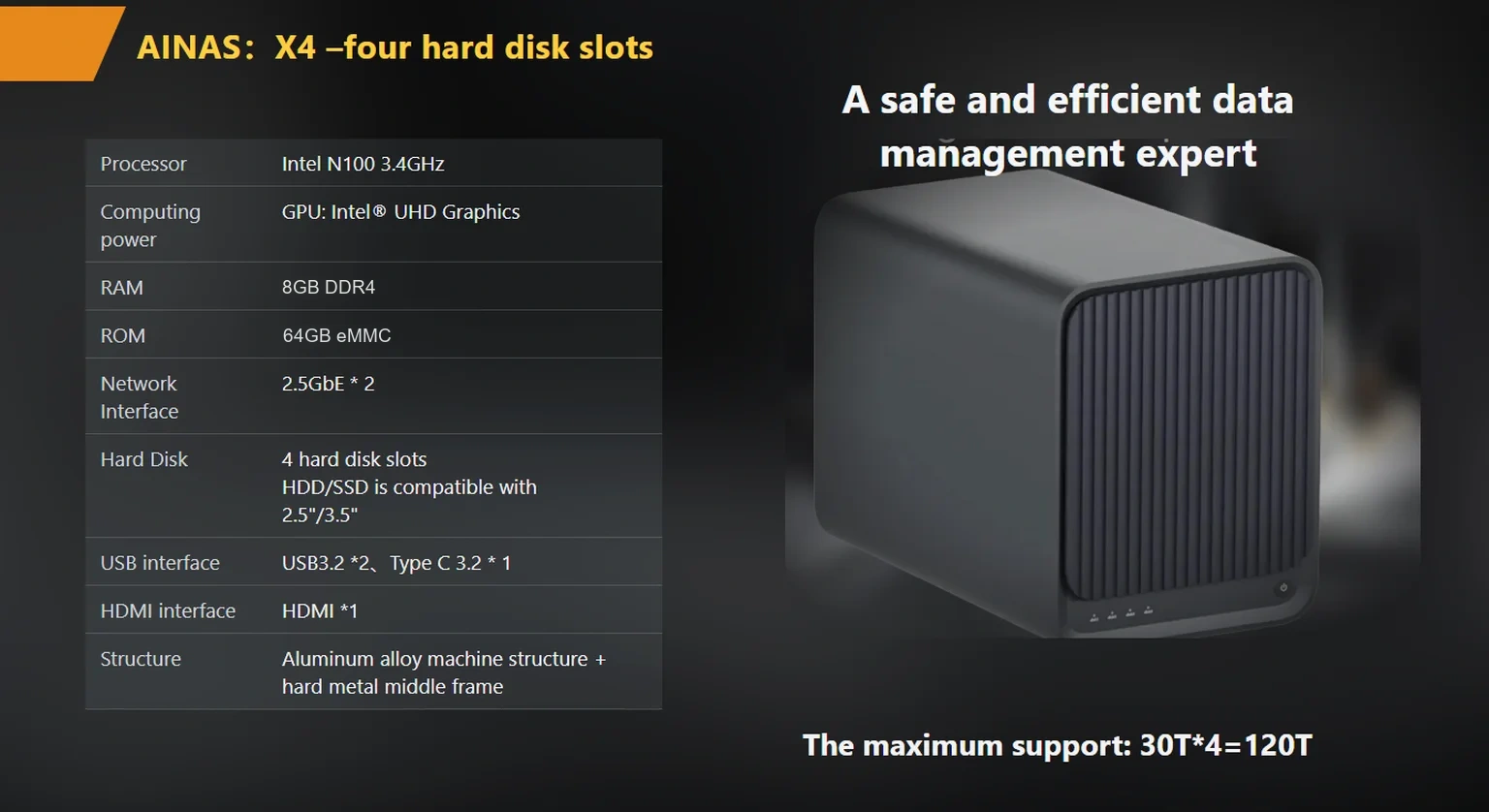
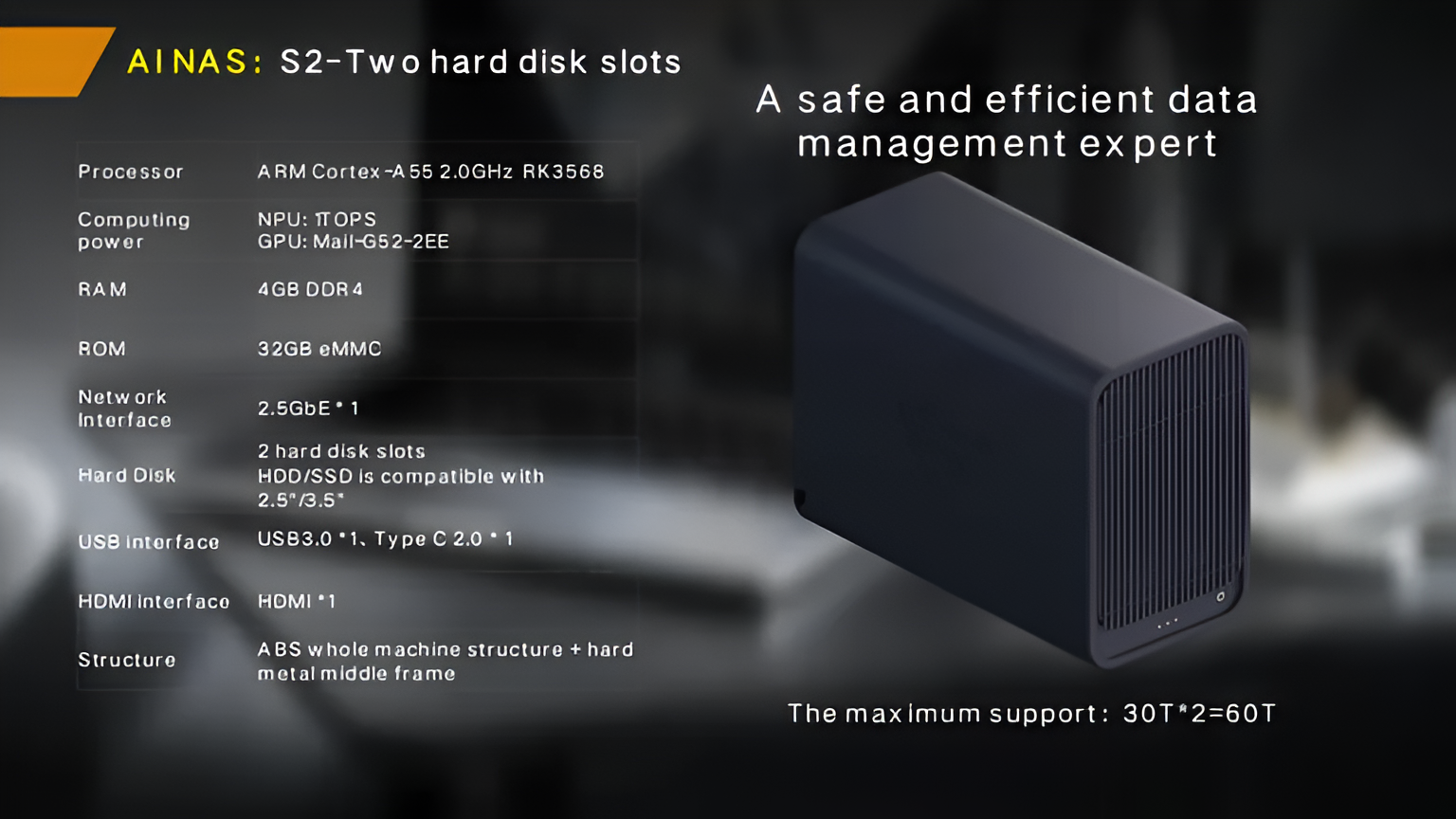
Two drives in RAID 1 is the floor for a two-bay unit such as the A2 Pro — every file exists twice, and a failed drive is a swap, not a loss. A four-bay X4 opens RAID 5 and RAID 6, which trade some usable capacity for tolerance of one or two drive failures. What no RAID level protects against is deletion, theft or fire, which is why the off-site copy question sits high on the verification list. RAID and off-site copies answer different failure modes; budget for both.
Migrations fail on sequencing, not hardware. A workable outline: week one, inventory what the current subscription actually holds — folder structures, sharing rules, and which devices sync. Week two, set up the appliance on the local network, create accounts with the isolation model you confirmed in writing, and connect a single test device. Week three, move the bulk of the library and run the first full backup to your off-site target. Week four, switch daily-device sync to the appliance, keep the old plan in read-only mode for one billing cycle, and then cancel it. A self-hosted cloud appliance earns its keep in week four; every week before that is validation, and skipping a week usually means discovering a broken sharing rule after the old account is gone.
The recurring fee is not the whole ledger, though. The recurring fee disappears, but three smaller costs appear: the appliance’s electricity draw (these platforms do not publish power figures — ask rather than assume), an eventual drive replacement, and your own administration time — call it a handful of hours per month as a working assumption for a small office, and verify against your own first quarter. A fair comparison includes all three. Even so, the buyout shape holds for storage-heavy libraries: the hardware is paid once, while a subscription compounds for as long as the data exists.
Fit is about workload shape. Households consolidating photo and video libraries, small offices keeping shared project folders, and solo professionals with archive-heavy libraries all fit — their data is written once and read often, which is exactly what a local array serves cheaply. Teams whose daily work lives inside collaborative documents, or organizations that cannot operate any local hardware at all, do not fit, and a hosted plan remains the honest answer for them.
woCyber publishes four compact platforms for this layer — the full list sits on the products hub page, and the honest way to choose among them is bay count and ceiling: one bay (A3 Pro) for a personal archive, two bays (A2 Pro, S2) for mirrored households and small offices, four bays (X4) for growth and RAID 5 headroom. Prices are published per model as listed above, with volume and OEM pricing on request at MOQ 100 units.
Before you decide, verify the security basics against public guidance: CISA publishes current baseline guidance for securing small-organization networks, and the NIST Cybersecurity Framework lays out an identify-protect-detect-respond structure that maps neatly onto appliance administration. Both are worth an hour before the purchase order, because the administration role you are taking on is a security role, not just a storage role.
The uncomfortable item on the list is the one nobody prices: the shared habits the subscription built. Shared links sent to clients, version histories nobody remembers enabling, a login one family member owns outright — none of these appear on the invoice, and all of them surface during migration. Walk the list in week two while the old account is still open, because after the cancel button, those habits become support tickets.
Whether you need surveillance storage, private cloud for business data or an OEM/ODM partner, our export team will map the right platform to your application — reply within one working day.
 Browse all platforms →
Branding starts last on a multi camera AI NVR OEM platform, not first. The order that holds up: camera count in writing,…
November 19, 2026NAS sourcing for US importers lives or dies on documentation: the certification file, the shipping paperwork, and the commercial terms confirmed in…
November 19, 2026Custom NAS development for AI startups turns a generic storage box into a data pipeline that matches how your team trains, checkpoints…
Ask our export team for the OEM/ODM cooperation guide and a written quotation.
