Leo · 2026-11
A NAS for large movie and TV library storage is a network appliance sized around the size of your collection rather than the number of screens in the house. Budget one terabyte per 22 hours of 1080p and one per five hours of 4K, then add 15 percent headroom and a RAID parity drive.

woCyber is the export brand of a Beijing-based storage hardware manufacturer, so the sizing advice below comes from a product line built for OEM buyers rather than from a retail shelf. The arithmetic is the part most buyers skip, and it is the part that decides whether the box lasts four years or gets replaced after two.
A large library needs 40 to 70 TB once disc rips replace streaming. The number is driven by bitrate, not by film count, which is why two collections of 1,000 titles can differ by a factor of six.
Disc rips arrive in two forms. A remux keeps the original video stream and typically runs 25 to 60 GB for a 1080p film and 60 to 100 GB for a 4K film. A compressed encode cuts that by half to two thirds and costs CPU time up front. Television adds up faster than film buyers expect, because a single season of hour-long episodes at 8 Mbps is roughly 18 GB.
The bitrate formula is worth memorising: gigabytes = Mbps × seconds ÷ 8 ÷ 1,000. An 8 Mbps episode of 3,600 seconds works out to 3,600 megabytes, or 3.6 GB. That single line lets you price any collection before you buy hardware.
A 1,200-film library with 800 hours of television fits comfortably in four 30 TB drives running RAID 5, which yields 90 TB of usable space. Smaller drives force you into six or eight bays, and that changes the chassis class and the budget.
Work the example through. At 45 GB per film, 1,200 films consume 54 TB. The 800 hours of television at 3.6 GB per hour consume 2.9 TB. Total is 56.9 TB, and the target is to stay under 75 percent of usable capacity so that RAID rebuilds and snapshots have room. Four 30 TB drives in RAID 5 give 90 TB usable, and 56.9 TB is 63 percent of that. Four 20 TB drives give 60 TB usable, which puts the same library at 95 percent and leaves no room for a rebuild.
| Library profile | Raw size | Drives and RAID | Usable | Utilisation |
|---|---|---|---|---|
| 400 films, 200 hours TV | 19 TB | 2 × 20 TB, RAID 1 | 20 TB | 95 percent, too tight |
| 800 films, 500 hours TV | 37.8 TB | 4 × 16 TB, RAID 5 | 48 TB | 79 percent |
| 1,200 films, 800 hours TV | 56.9 TB | 4 × 30 TB, RAID 5 | 90 TB | 63 percent |
| 2,000 films, 1,400 hours TV | 95 TB | 4 × 30 TB, RAID 5, second shelf later | 90 TB | Over capacity |
The published X4 specification lists 4 bays and a 120 TB maximum, with RAID 0, 1, 5, 6 and 10 and tool-free trays. That ceiling is what makes a four-bay chassis viable for a library this size: at 30 TB per drive the array lands at 120 TB raw.
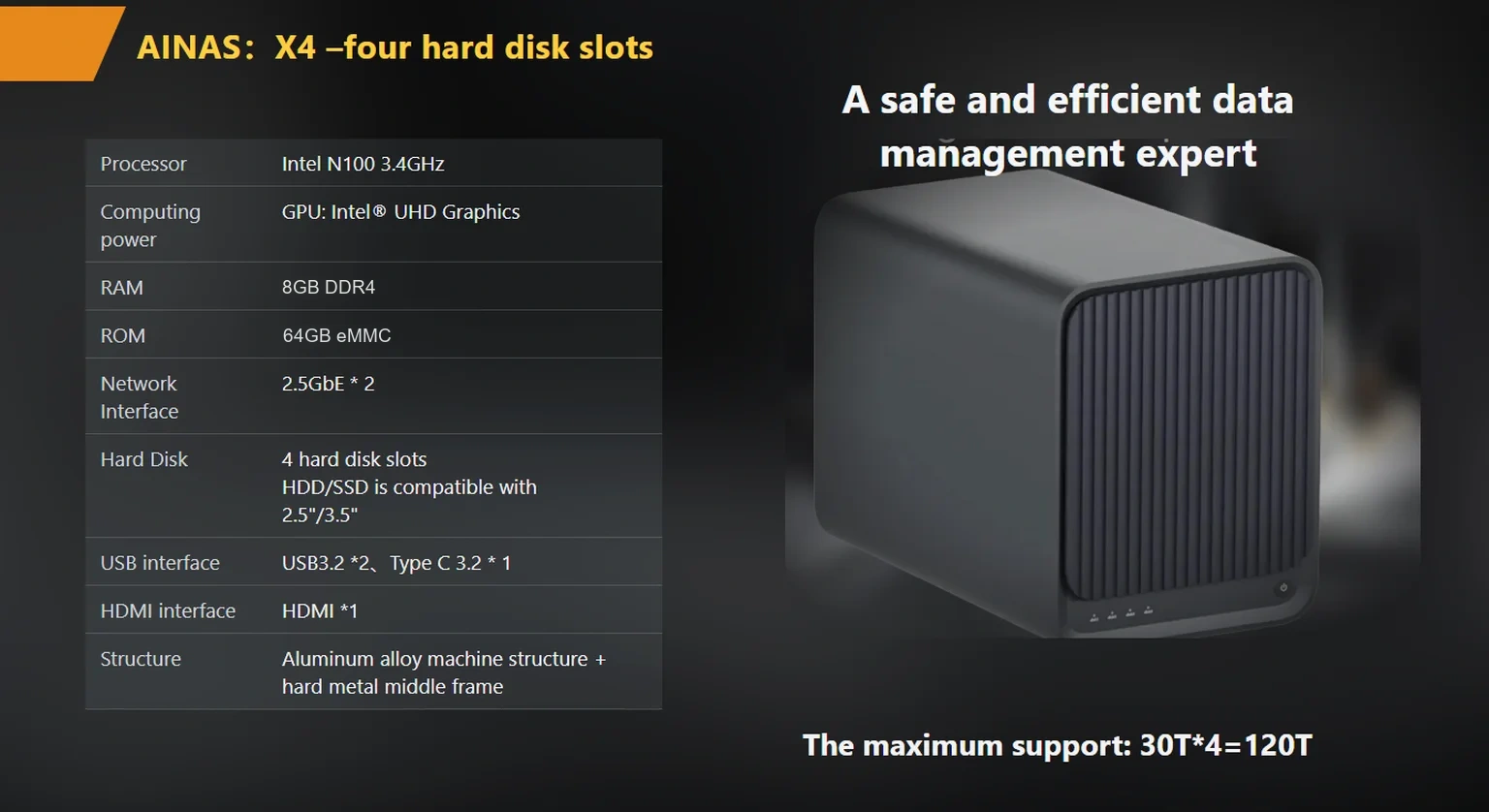
Hardware transcoding decides whether a 4K remux plays on a 1080p television without stalling. The server has to decode and re-encode video in real time, and a general-purpose CPU alone will not keep up with more than one or two simultaneous streams.
The published X4 specification lists an Intel N100 processor with Intel UHD hardware 4K transcoding and an HDMI output at 4K@60 Hz, 4096×2160. The HDMI specification sets the bandwidth and timing rules behind that output class, and the ITU-T H.264 recommendation defines the codec that most libraries still store. Buyers who plan to keep remuxes should treat transcoding as a hardware requirement, not a software toggle.
A practical check: count the screens that will ever watch at the same time, then add one for a phone or tablet on the road. Two simultaneous 4K-to-1080p jobs is the working ceiling for most four-bay appliances in this class, and vendors who quote higher numbers are usually quoting codec-specific results.

Loading 57 TB takes about six days over a single gigabit link and about two and a half days over 2.5GbE. The copy is a one-time cost, but the backup job that follows runs on the same link every week.
Gigabit Ethernet moves roughly 118 megabytes per second in practice, and 2.5GbE moves roughly 295 megabytes per second. On 57 TB, or about 59.8 million megabytes, that is 506,000 seconds against 202,000 seconds. The second number is why a 2.5GbE port changes the weekly routine rather than only the initial migration.
Consider a hypothetical household that ripped 1,200 films over three years onto external drives. The library is 57 TB, the weekly backup goes to a second shelf, and the nightly job only copies new titles. In that pattern the bottleneck is the first migration and the annual scrub, not daily playback, so a single 2.5GbE port is enough and link aggregation is optional. Buyers who also run editing jobs against the same array should read the throughput notes in multigigabit-nas-upgrade-planning before ordering drives.
RAID 5 is the usual answer for four bays because it survives one drive failure and gives up only one drive of capacity. RAID 6 costs a second drive but survives two failures during a rebuild, and that matters when drives are 30 TB.
A 30 TB rebuild can run for a day or more at sustained write speeds, and a second failure inside that window loses the array. Buyers who store remuxes they cannot re-rip should pay for RAID 6 and accept 60 TB usable on four 30 TB drives. Buyers who keep a separate offline copy of the collection can stay on RAID 5.
RAID is not a backup. The published product line handles disk failure, not deletion, ransomware or fire. A second appliance or a set of offline drives is still required, and the sizing above should include the copy, not only the library.
Buyers should confirm drive compatibility, RAID level, network port count and the warranty term in writing before the order is placed. Verbal assurances about future firmware features do not survive a change of sales contact.
woCyber publishes a standard 3-year warranty and operating experience of 15+ years in storage OEM and ODM work, with research and development in Beijing and mass production in Shenzhen. The published certification set for the product lines is CE, UKCA, FCC, RoHS, REACH and WEEE. Reference pricing for the four-bay X4 is $400 per unit in USD, excluding shipping and tariffs, with volume terms quoted against a 100-unit minimum per SKU.
For buyers comparing a four-bay appliance against a two-bay starter, 4-bay-nas-for-home-media-streaming-2026-buyer-s-guide covers the trade-off in bay count and rebuild risk. Buyers checking transcoding claims against codec support should start with best-4-bay-nas-for-4k-transcoding-2026-hardware-checklist. The X4 platform page lists the port layout, RAID matrix and OEM options on products/x4-nas-server.

The library should be organised by retention value rather than by genre. Films and series that will never be deleted sit in one share; imports, temporary downloads and work in progress sit in another with a shorter lifecycle.
That split changes what a backup job has to walk. A 57 TB library where 4 TB changes weekly is a very different backup proposition from one where the whole volume is scanned. Separate shares also make it easier to keep snapshots on the fast-changing volume and skip them on the archive, which saves capacity on drives that hold content nobody edits.
Two practical rules. Keep the metadata and artwork on the same volume as the media, so a rebuild does not orphan it. Keep the download staging folder on a separate share, because that is where duplicate copies accumulate and where a failed import leaves half-written files.
Is a four-bay NAS enough for 1,000 films? Yes, if the drives are 20 TB or larger and the films are compressed. Four 20 TB drives in RAID 5 give 60 TB usable, which holds about 1,000 films at 45 GB plus 500 hours of television at 74 percent utilisation.
Do I need 2.5GbE for playback? No. A single 4K stream needs about 100 Mbps, well inside gigabit. 2.5GbE shortens migration and backup windows, which is where the time actually goes on a library above 30 TB.
Can a NAS transcode 4K remuxes to 1080p? Hardware transcoding on the X4 is specified for 4K, and the practical limit is the number of simultaneous streams rather than a single job. Ask the supplier to state how many concurrent sessions the firmware supports.
Should the library live on RAID 5 or RAID 6? Choose RAID 6 when drives are 30 TB and the content cannot be re-ripped. The rebuild window is long enough that a second failure is a real risk, and RAID 6 removes it at the cost of one more drive.
What capacity should I leave free? Keep utilisation under 75 percent. Above that, rebuild times rise, snapshots run out of space, and the array has no room for a temporary copy during a drive replacement.
Whether you need surveillance storage, private cloud for business data or an OEM/ODM partner, our export team will map the right platform to your application — reply within one working day.
 Browse all platforms →
Branding starts last on a multi camera AI NVR OEM platform, not first. The order that holds up: camera count in writing,…
November 19, 2026NAS sourcing for US importers lives or dies on documentation: the certification file, the shipping paperwork, and the commercial terms confirmed in…
November 19, 2026A self-hosted cloud appliance keeps your files on hardware you own and still serves them to every device you use. This verification…
Ask our export team for the OEM/ODM cooperation guide and a written quotation.
