Leo · 2026-10
A multigigabit NAS upgrade means moving the storage link from 1GbE to 2.5GbE or faster so the network stops capping throughput before the drives do. For most 5- to 30-person offices, 2.5GbE is the cheapest step that removes that ceiling.

The easy assumption is that a 2.5GbE NAS is simply a 1GbE NAS plus a bigger number on the box. It rarely works out that way. A multigigabit NAS upgrade is a small system decision: the port on the appliance, the port on the switch, the category of cable run through the wall, and the protocol the client speaks all have to clear the same bar before a single file moves faster. Miss one and the transfer silently reverts to gigabit, which is why so many teams report “we bought 2.5GbE” and still see 110 MB/s.
This article is written for the person who has to specify that upgrade — the IT manager at a 12-person design firm, the integrator quoting a warehouse office, the finance lead signing off on a switch. It sets out where the ceiling sits, how to plan an upgrade you will not have to redo, and which numbers belong in the requisition.
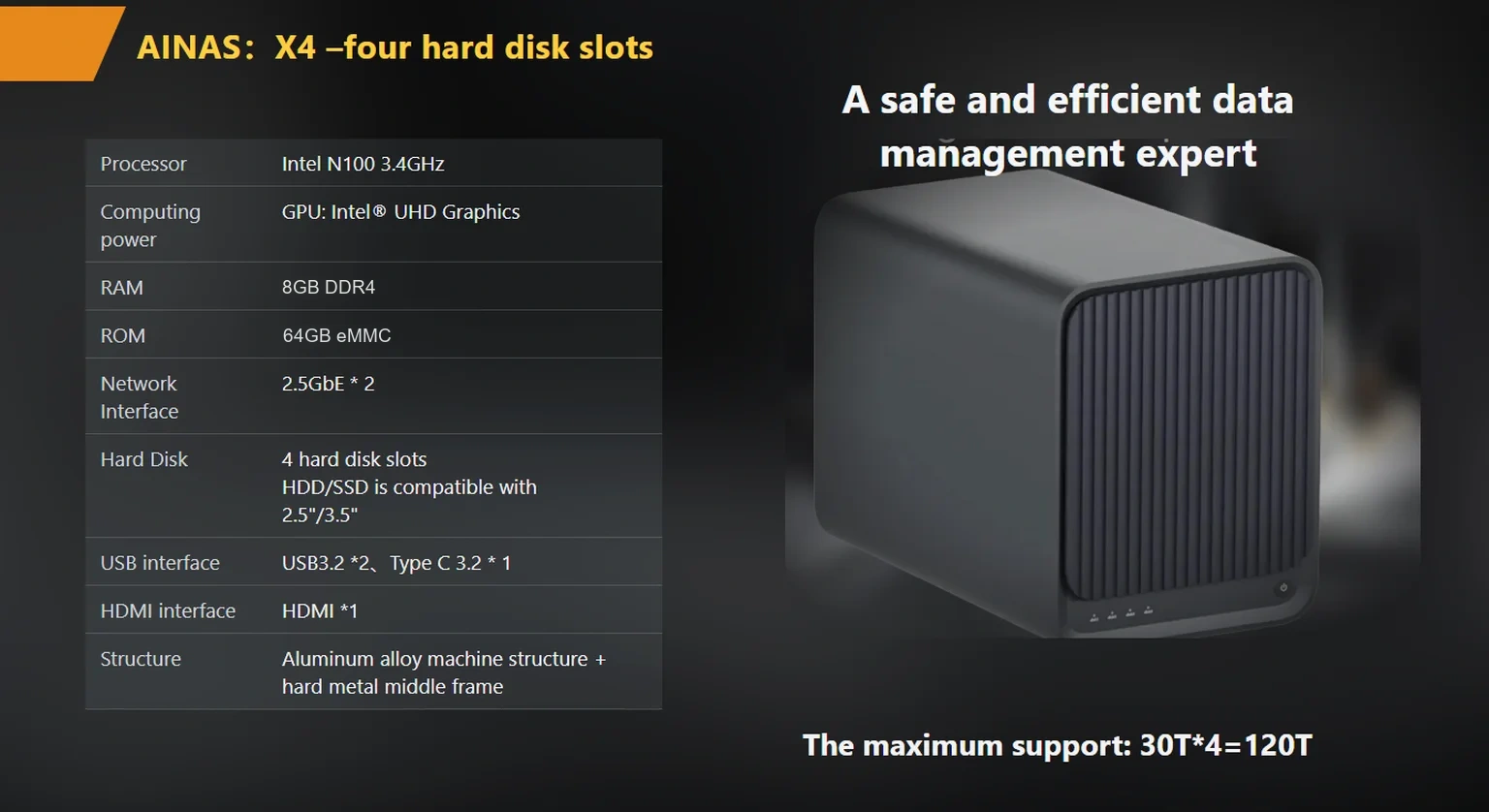
A multigigabit NAS upgrade on woCyber hardware starts with ports rated above gigabit. The published configurations differ in exactly that respect: the S2 dual-bay hub carries one 2.5GbE port, and the X4 four-bay appliance carries two, supporting aggregation and failover for up to 5 Gbps of combined capacity.
2.5GbE is an Ethernet link rated at 2.5 gigabits per second, roughly 2.5 times the throughput of the 1GbE port found on most consumer and entry NAS hardware. Working from the standard rate rather than from a measured test, that lifts the theoretical single-stream ceiling from 125 MB/s to 312.5 MB/s before protocol overhead — which for a single large sequential copy roughly halves the time the transfer itself takes.
A quick unit note: MB/s is megabytes per second and GbE is gigabits per second — eight bits to a byte, so a 2.5 Gbps link moves at most about 300 megabytes per second, and real-world figures land lower once protocol overhead is counted. Network signaling standards at these rates come from the IEEE 802.3 working group, which publishes the underlying 2.5GBASE-T specification.
On the woCyber side, two published configurations reach that rate directly.
The bottleneck sits at the slowest hop on the path, and the path almost always has more hops than buyers count. A file copied from a laptop to a NAS passes through the laptop’s own link, the switch, the cabling, the NAS port, and the storage array underneath. Any single hop rated at 1GbE caps the whole transfer, whatever the NAS spec sheet says.
This is why the appliance port is the first thing to settle. In the published woCyber range, a 1GbE port appears on the compact A2 Pro, a single 2.5GbE port on the S2, and two aggregated 2.5GbE ports on the X4 — a ladder that maps directly onto how many clients pull large files at once.
Walk the hops in order and most upgrades resolve to one of five causes:
The sequencing point is decisive: measure the client link first. Teams that buy a 2.5GbE switch before checking their laptops end up with a faster path to a slower destination.
The sequence is NAS port first, switch second, cabling third, clients last, because that order follows cost and reversibility.
| Stage | What changes | Disruption | What it unlocks |
|---|---|---|---|
| 1. Appliance ports | Choose a NAS with 2.5GbE (S2: one port; X4: two ports, aggregation to 5 Gbps) | Replacement or new deployment | Removes the hard ceiling at the NAS itself |
| 2. Switch | Add a 2.5GbE-capable switch, or mixed 1GbE/2.5GbE ports | Short maintenance window | Lets more than one client reach 2.5GbE at once |
| 3. Cabling | Verify Cat5e runs, move to Cat6/Cat6a where runs are long | Scheduled, per-run | Stops silent renegotiation to gigabit |
| 4. Clients | 2.5GbE adapters or newer workstations | Per-seat, can be staged | Makes the faster path end-to-end |
Stage 1 is the decision most buyers get right and then undo. If the appliance has only one 2.5GbE port and four people move large files at once, the single port becomes the new bottleneck; two ports with link aggregation on the X4 exist for that case. Note that a second port is not a doubling guarantee — aggregation helps when several clients pull at once, not when one client pulls one file.
If your team is consolidating project storage, camera retention, and a document archive onto one appliance at the same time, it is worth reading how enterprise-nas-cold-data-storage separates fast working data from an archive tier before you fix the port count.
The calculation is a two-line comparison: measure what the storage can deliver, measure what the link can deliver, and the lower number wins. Everything else is commentary.
Link ceiling in megabytes per second is the rated link speed divided by eight, adjusted for overhead:
Link ceiling (MB/s) ≈ (link speed in Gbps × 1000) ÷ 8 × 0.9
Worked example, using a single sequential transfer: a 1GbE port is 1 Gbps, so 1000 ÷ 8 = 125 MB/s, times 0.9 overhead ≈ 112 MB/s. A 2.5GbE port is 2.5 Gbps, so 2500 ÷ 8 = 312.5 MB/s, times 0.9 ≈ 281 MB/s. That is a factor of about 2.5. The same 50 GB folder takes roughly 7.5 minutes over 1GbE and about 3 minutes over 2.5GbE.
Now compare against the storage side. A single 3.5″ spinning drive typically sustains sequential reads well below 281 MB/s, so a one-drive appliance cannot saturate a 2.5GbE link on its own; a multi-drive array reading in parallel can. This is the second reason the X4’s four bays count beyond capacity, since drive count is also a throughput question.
Run this arithmetic before buying anything. If the storage ceiling is 150 MB/s and the link ceiling is 112 MB/s, a network upgrade buys roughly 34 percent more throughput on sequential work; if the storage ceiling is 90 MB/s, a 2.5GbE upgrade here changes nothing.
Most silent reversions come from negotiation behaviour rather than broken hardware. Ethernet links negotiate the highest speed both ends support, and when they disagree the link settles at the slower rate without an error message.
Three situations produce this outcome again and again. First, a 2.5GbE NAS plugged into a 1GbE switch port: the appliance is capable, the switch is not, and the link lands at 1GbE. Second, a 2.5GbE-capable client on a long Cat5e run that no longer handles 2.5GBASE-T reliably, so the PHY drops back. Third, power-saving or driver settings on the client NIC that default to a lower advertised speed.
The diagnostic that settles it in one step is reading the negotiated link speed on each hop: the switch management page, and the NAS network status. If any hop reports 1000 Mb/s, that hop is the ceiling, and the fix is local to that hop.
The specification should list the negotiated speed required at every hop, not just the marketing speed of the appliance. Speed claims on a datasheet describe a capability; a specification describes an outcome.
The reference points for those speed claims sit in published standard documents rather than in vendor literature. The IEEE 802.3bz task force published the 2.5GBASE-T and 5GBASE-T specifications that define what these link speeds mean over copper cabling, and the T10 technical committee maintains the storage command standards that govern how drives report performance and errors.
A short but complete version covers five lines, shown below against where each figure is confirmed.
| Specification line | What to write | Where it is confirmed |
|---|---|---|
| Appliance ports | Port count, speed, aggregation and failover support, capacity ceiling | Supplier datasheet and product page |
| Switch | Per-port rating, whether 1GbE and 2.5GbE ports are mixed | Switch specification |
| Cabling | Category and maximum run length per drop | Installation record; IEEE 802.3bz for the rate over copper |
| Client adapters | Adapter model and driver version per seat | Workstation inventory |
| Acceptance test | File type, file size, measured throughput threshold per client | Test run at handover |
For procurement purposes, the appliance line should read something like “4-bay NAS, two 2.5GbE ports with link aggregation and failover up to 5 Gbps, capacity to 120 TB, RAID 0/1/5/6/10” rather than “fast network”.
Two commercial points belong in the same document even though they are not technical. First, confirm the power and physical fit: a 4-bay appliance with active multi-fan thermal control is a different install than a 2-bay desktop unit. Second, confirm what the supplier will commit to in writing — capacity and configuration in the quotation, certification documents with the shipment, and which party owns any custom tooling if this is an OEM programme. The products/x4-nas-server page lists the published port, bay, and RAID configurations for the enterprise model.
For buyers planning a multi-site rollout, the ai-ready-nas-hardware-requirements checklist covers the requirements that sit next to networking — memory ceiling, storage tiering, and RAID geometry.
Take a hypothetical architecture practice with 18 staff, two offices on the same floor, and a 6 TB working set of CAD files plus 40 TB of project archive. Their current setup is a 1GbE NAS with four bays and a single 2.5GbE switch nobody configured, and the complaint is that saving large models stalls during the afternoon.
Their upgrade lands in three stages. Stage one replaces the appliance with a four-bay unit carrying two 2.5GbE ports and moves the switch to a managed 2.5GbE model; that alone lifts aggregate throughput for concurrent users, because several clients share a 2.5GbE uplink instead of contending on one gigabit port. Stage two adds 2.5GbE adapters to the six workstations handling the largest models. Stage three replaces the two longest cable runs, which sit near the limit of what Cat5e handles reliably at 2.5GBASE-T.
The arithmetic justifying stage two: a 3 GB model save takes roughly 27 seconds at 112 MB/s and roughly 11 seconds at 281 MB/s. A designer saving 25 times a day recovers around seven minutes of focused time daily — worth measuring, but the stronger argument is the queueing effect, where one person’s large save stops blocking the other five.
The platform choice follows the port count and the bay count, not the brand preference.
| Deployment | Network requirement | Fit |
|---|---|---|
| 1–4 seats, one heavy user | One 2.5GbE uplink | Dual-bay hub with a single 2.5GbE port, capacity to 60 TB |
| 5–30 seats, several concurrent editors | Two ports with aggregation, mixed 1GbE/2.5GbE clients | Four-bay appliance, two 2.5GbE ports to 5 Gbps, RAID 0/1/5/6/10, capacity to 120 TB |
| Site with a 10GbE backbone already in place | 10GbE uplink | Four-bay appliance with 10GbE port mixing available as an OEM configuration |
| Site also running camera retention | Separate VLAN, PoE cameras, ONVIF support where cameras are in scope | Edge AI appliance with on-device inference and PoE IP camera onboarding |
Two practical notes on the last row. Mixing surveillance traffic onto the same link as file serving is workable at small scale and becomes a measurement exercise at larger scale, because continuous recording consumes bandwidth whether or not anyone is watching. Where cameras are in scope, verify ONVIF support as a capability rather than treating it as a certification document.

Put negotiated speed, not rated speed, in the requisition. A requisition that reads “2.5GbE NAS required” will be met by a device with a 2.5GbE port and no path to use it. One that reads “measured sequential throughput of at least 250 MB/s from a client to the appliance across a 35-metre run” describes something you can accept or reject.
Alongside those, confirm the commercial facts in writing — MOQ for a pilot if this is an OEM programme, which documents ship with the unit, and whether terms are recorded at quotation or at order confirmation.
One judgment worth putting to the budget holder before any order is placed: in our experience of how these projects are specified, bay count is almost always over-scoped and port bandwidth almost always under-scoped. Capacity can be added later by swapping drives. A path that was never specified for multigigabit becomes a re-cabling project, and that one is far harder to absorb.

Is 2.5GbE worth it over 1GbE for a small office? It is worth it when the work is large-file and repeatable — video, CAD, RAW images, virtual machines. Sequential transfers run roughly 2.5 times faster, and concurrent users stop contending on a single gigabit port.
Do I need a special cable for 2.5GbE? Cat5e is commonly rated for 2.5GBASE-T over runs up to 100 metres, but marginal or long runs can force a fallback to gigabit. Cat6 or Cat6a removes the uncertainty and is the safer specification for new installs.
Does link aggregation double my transfer speed? Not for a single transfer. Aggregation combines two 2.5GbE ports into up to 5 Gbps of aggregate capacity that benefits multiple simultaneous clients; one client copying one file is still bounded by its own link and by the array.
How do I know if my NAS is negotiating at gigabit? Read the negotiated link speed on the switch and in the NAS network status. If either side reports 1000 Mb/s, that hop is the ceiling.
Can I keep my existing 1GbE switches and just buy a 2.5GbE NAS? Yes, but the NAS will run at 1GbE because the switch port negotiates down. The appliance is only the first stage of the upgrade, not the whole of it.
Whether you need surveillance storage, private cloud for business data or an OEM/ODM partner, our export team will map the right platform to your application — reply within one working day.
Key takeaways An FCC-recognized lab must hold the right scope for your device's rule part, not just any accreditation. A 2-bay NAS…
November 3, 2026Shared storage for deskside AI clusters refers to a storage appliance on the office LAN that holds datasets, checkpoints and embeddings for…
November 3, 2026A cloud storage subscription cost is the recurring fee a business pays to keep its files on a provider's servers, billed per…
Ask our export team for the OEM/ODM cooperation guide and a written quotation.
