Leo · 2026-10
An AI agent storage hub appliance is a local storage system that keeps an agent’s working corpus, retrieval index, run logs and model files on disks the buyer owns, reachable over the office network. US buyers specify four things first: usable capacity after RAID, the memory ceiling, 2.5GbE throughput, and a log retention rule.

An AI agent storage hub appliance is the chassis that holds everything a software agent must read and remember, and it sits inside the buyer’s own network rather than behind a vendor API. The appliance is not a faster file server; the appliance is the place where the agent’s evidence lives.
The read pattern separates the two categories. A person opens one document and reads it; an agent opens dozens of files to answer a single question, cites two of them, and writes a trace of every step. That pattern turns random-read latency, file count and log volume into first-order requirements, while a plain file server only ever worried about total terabytes.
Buyers who ask which hardware fits this role usually arrive from a pilot that ran on a workstation. The pilot proved the workflow and proved nothing about concurrency, retention or rebuild time. A dedicated appliance answers those three questions before the second team joins the pilot.
An agent hub carries four data sets, and each one grows at a different rate, which is why a single capacity number rarely survives the first year.
The four sets fail in different ways. A corpus that outgrows the array forces a migration; an index that outgrows memory turns every query into a disk walk; a log volume with no retention rule fills the last free blocks during a holiday weekend. Teams still comparing chassis against workload profiles can work through the agentic-ai-workload-storage-buyer-checklist“>agentic AI workload storage checklist before fixing a budget.
For a 12-person analytics team with an 18 TB document corpus, plan roughly 26 TB of usable capacity before parity. The figure comes from four additions, not from a rule of thumb.
Worked example (illustrative, not a customer case): a hypothetical 12-person analytics firm runs three document agents over 18 TB of reports and spreadsheets, with logs at 4 GB per day and a 90-day retention policy. Assume the retrieval index adds 20 percent of corpus size, and keep one snapshot copy of that index for rollback.
Total: 18 + 3.6 + 3.6 + 0.36 + 0.3 = 25.86 TB, which rounds to 26 TB of usable capacity. Parity then decides the drive count. Four 12 TB drives in RAID 5 yield (4 – 1) x 12 = 36 TB usable, which clears the target with room for one year of corpus growth. The same four drives in RAID 6 yield (4 – 2) x 12 = 24 TB usable, which misses the 26 TB target by 2 TB and would force larger drives or a fifth bay.
That gap is the whole argument for calculating before ordering. RAID 6 buys tolerance for a second drive failure during a rebuild, and the price of that tolerance is one drive of capacity. A buyer who wants both tolerance and headroom should size drives against the RAID 6 number, not the RAID 5 number.
A single uplink slows every query once retrieval concurrency passes what the link can carry, because each query reads many files and a saturated link serialises those reads. Capacity determines what the hub can hold; the link determines how fast the hub can answer.
A 2.5GbE link carries 2.5 Gbps, which is 312.5 MB/s at line rate before protocol overhead. A planning assumption of two thirds of line rate puts the transfer near 200 MB/s, and the assumption is stated rather than measured: seeding an 18 TB corpus then takes 18,000 GB / 0.20 GB/s = 90,000 seconds, about 25 hours. Aggregating two ports at 5 Gbps doubles the line rate to 625 MB/s; the same two-thirds assumption gives about 400 MB/s and a seed near 45,000 seconds, about 12.5 hours.
Neither number is a benchmark of a specific appliance. The practical reading is narrower: an overnight seed against a reindex that runs across two working days, a gap that teams rebuilding weekly feel every week.
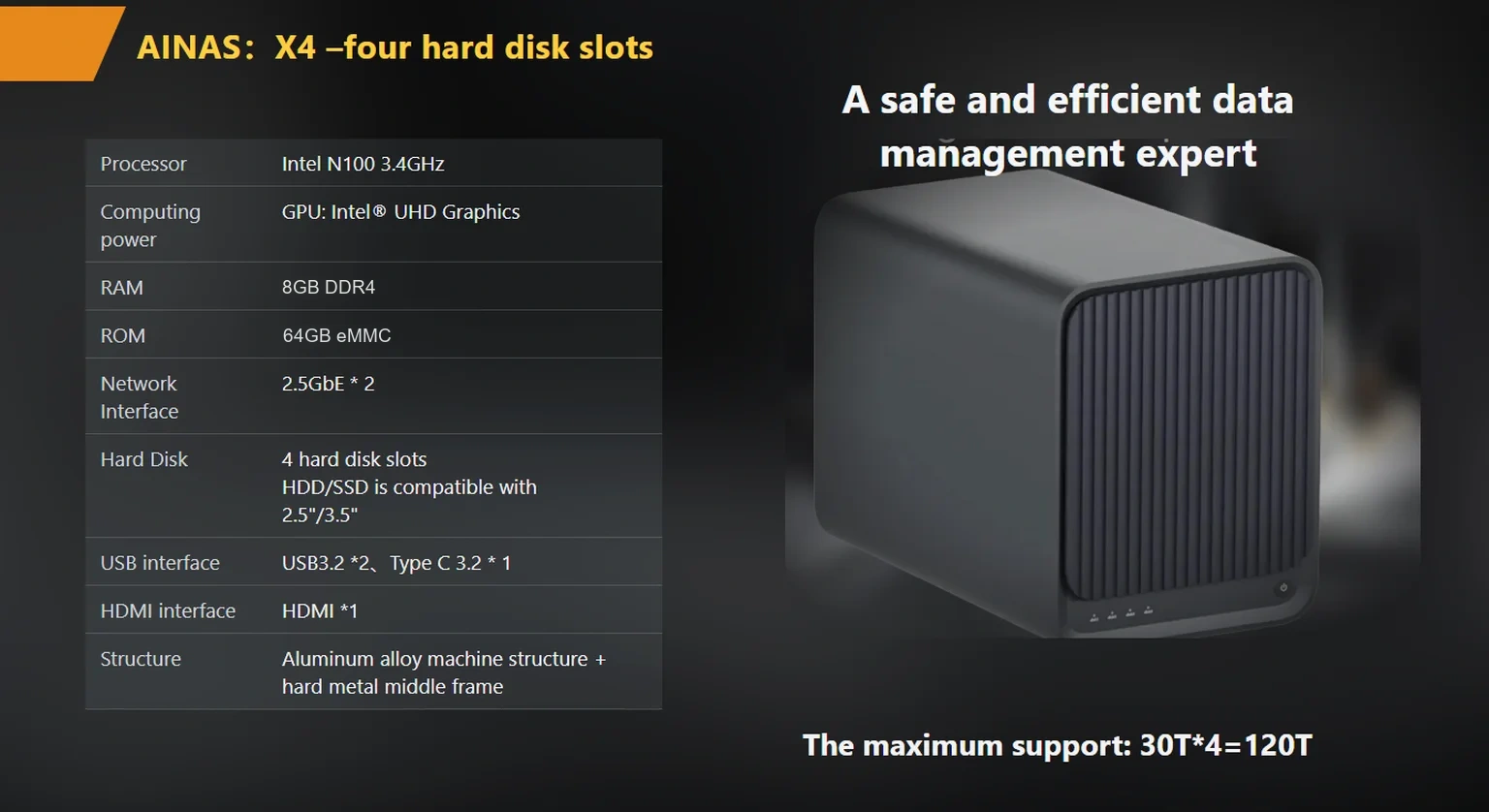
Port count matters as much as port speed. A single uplink is a single point of failure for every agent on the hub, while a second port can carry failover traffic when the first one drops. For this role the X4 4-bay enterprise NAS carries two 2.5GbE ports for aggregation or failover up to 5 Gbps, with 1GbE, 2.5GbE or 10GbE mixing as an OEM option.

Memory sets the ceiling on index size, and the ceiling belongs to the processor rather than to the disk shelf. Intel’s published specification for the Intel Processor N100 lists a maximum memory size of 16 GB (Intel ARK specification page, retrieved October 19, 2026). The published X4 specification lists 8 GB DDR4 as standard with an OEM configuration up to 16 GB, which is the platform limit and not a suggestion.
Boot storage is a separate resource that buyers routinely confuse with working storage. The X4 ships with 64 GB eMMC, available up to 128 GB through OEM configuration, and that volume holds the operating system, container images and local logs rather than datasets. An agent stack that pulls three container images and keeps 30 days of traces can fill a small boot volume without touching the array.
Container support completes the picture. The X4 runs containerised applications on the appliance, so the agent runtime and the storage share one chassis instead of two purchases and one network hop between them.
The comparison below maps each requirement to the number a buyer should read on a datasheet, then to the three platforms in the published woCyber range. Rows are ordered by how often they decide the purchase.
| Requirement | Number to check | X4 | S2 | A2 Pro |
|---|---|---|---|---|
| Usable capacity path | Bays and maximum raw capacity | 4 bays, up to 120 TB | 2 bays, up to 60 TB | 2 bays, up to 48 TB |
| Link throughput | Port count and speed | 2 x 2.5GbE, 5 Gbps aggregated | 1 x 2.5GbE | 1 x GbE |
| Memory ceiling | Standard and OEM maximum | 8 GB DDR4, OEM to 16 GB | 4 GB DDR4 | 4 GB DDR4 |
| Application hosting | Boot storage and containers | 64 GB eMMC, OEM to 128 GB, container support | 32 GB eMMC | 16 GB eMMC |
| Media handling | Transcode and output path | Hardware 4K transcode, HDMI 4K@60 | Not published | Not published |
| Data protection | RAID levels offered | 0, 1, 5, 6, 10 | Not published | RAID 1 |
Two readings follow from the table. A team that seeds once and reads incrementally can live with a single 2.5GbE port, while a team reindexing weekly should price the dual-port chassis first. A team holding a retrieval index in memory should check the OEM memory path before comparing drive prices, because the memory ceiling cannot be raised after the order. The reasoning behind that pressure on retrieval sits in why-storage-is-the-ai-bottleneck“>why storage became the AI bottleneck, and the rest of the range is listed on the products“>product overview page.
Six questions belong in the RFQ, and each one produces a written answer that a buyer can hold a supplier to later.
Commercial terms carry equal weight. The published OEM terms list MOQ from 100 units per SKU, rising to 1,000 units where a new PCB respin or new tooling is required, with NRE credited against agreed volume and tooling ownership transferring to the customer once paid. Samples ship at the published unit price and the sample fee is credited against the first mass-production order, and an NDA is typically returned within one working day.
Factory evidence answers the question a datasheet cannot. woCyber, the export brand of a Beijing-based storage hardware manufacturer, runs research and development in Beijing and mass production in Shenzhen, and the factory page describes 72-hour burn-in, 100 percent outgoing inspection with archived batch reports, and a certification set of CE, UKCA, FCC, RoHS, REACH and WEEE.

The retention rule on an AI agent storage hub appliance should state how long agent traces stay readable, who can read them, and what happens on day 91. Agent logs are the data set most often left undefined, and they are the first data set a security review asks about, because a trace records which files an agent opened and what it returned.
The OWASP Top 10 for LLM Applications treats sensitive information disclosure and excessive agency as named risk categories (OWASP GenAI Security Project, retrieved October 19, 2026). A retention rule that deletes traces on a schedule and restricts who can read them addresses the storage side of both categories without pretending to solve the model side.
Two practical settings belong in writing. A retention window measured in days, matched to the audit cycle rather than to disk space, and an access rule that separates the account running the agent from the account reviewing its traces. Where the platform supports account isolation, that separation is enforced by the device rather than by convention.
An agent hub usually needs more usable capacity than a file server serving the same people, because the index and the log trail sit alongside the corpus. A 12-person team with an 18 TB corpus should plan around 26 TB usable once index, snapshot and 90-day logs are counted.
One 2.5GbE port is enough when the corpus is seeded once and read incrementally, because retrieval reads small files rather than bulk transfers. A team that rebuilds its index weekly should budget for two ports and aggregation, since the rebuild window is where a single link hurts.
The index can share the array, and buyers should still separate it into its own volume so a rebuild does not compete with user reads. Splitting the volume also makes snapshot policy simpler, because the index changes far more often than the corpus.
RAID 5 maximises usable capacity on a four-bay chassis, and RAID 6 tolerates a second failure during a rebuild at the cost of one drive of capacity. Buyers should size drives against the RAID 6 figure when uptime during rebuild matters more than capacity.
The appliance does not need a cloud connection to store or serve the corpus, because the data path stays on the local network. A team that uses a hosted model endpoint still sends prompts out, and that decision belongs to the model layer rather than to the storage layer.
Whether you need surveillance storage, private cloud for business data or an OEM/ODM partner, our export team will map the right platform to your application — reply within one working day.
Key takeaways An FCC-recognized lab must hold the right scope for your device's rule part, not just any accreditation. A 2-bay NAS…
November 3, 2026Shared storage for deskside AI clusters refers to a storage appliance on the office LAN that holds datasets, checkpoints and embeddings for…
November 3, 2026A cloud storage subscription cost is the recurring fee a business pays to keep its files on a provider's servers, billed per…
Ask our export team for the OEM/ODM cooperation guide and a written quotation.
