Leo · 2026-11
The storage box you already own may be able to run a language model, and buyers ask about this weekly now. the short version: sometimes. A NAS (network-attached storage: a disk enclosure with its own processor and operating system that serves files over the network) can host a small quantized LLM beside your files, with no per-token invoice.

This guide covers how to deploy LLM on NAS hardware in practice: 8 GB of RAM as the workable minimum, container support on the firmware side, and a workload of one to a few simultaneous users. Quantized 7-8B models fit that envelope. Larger models, or a dozen concurrent users, belong on a GPU server. Run the arithmetic below and your project will land on one side of that line.
Start with the honest answer: a NAS is a file server first and an inference host second. It runs small quantized models for single-digit user counts. It does not train models, and it does not serve an entire department asking questions at once.
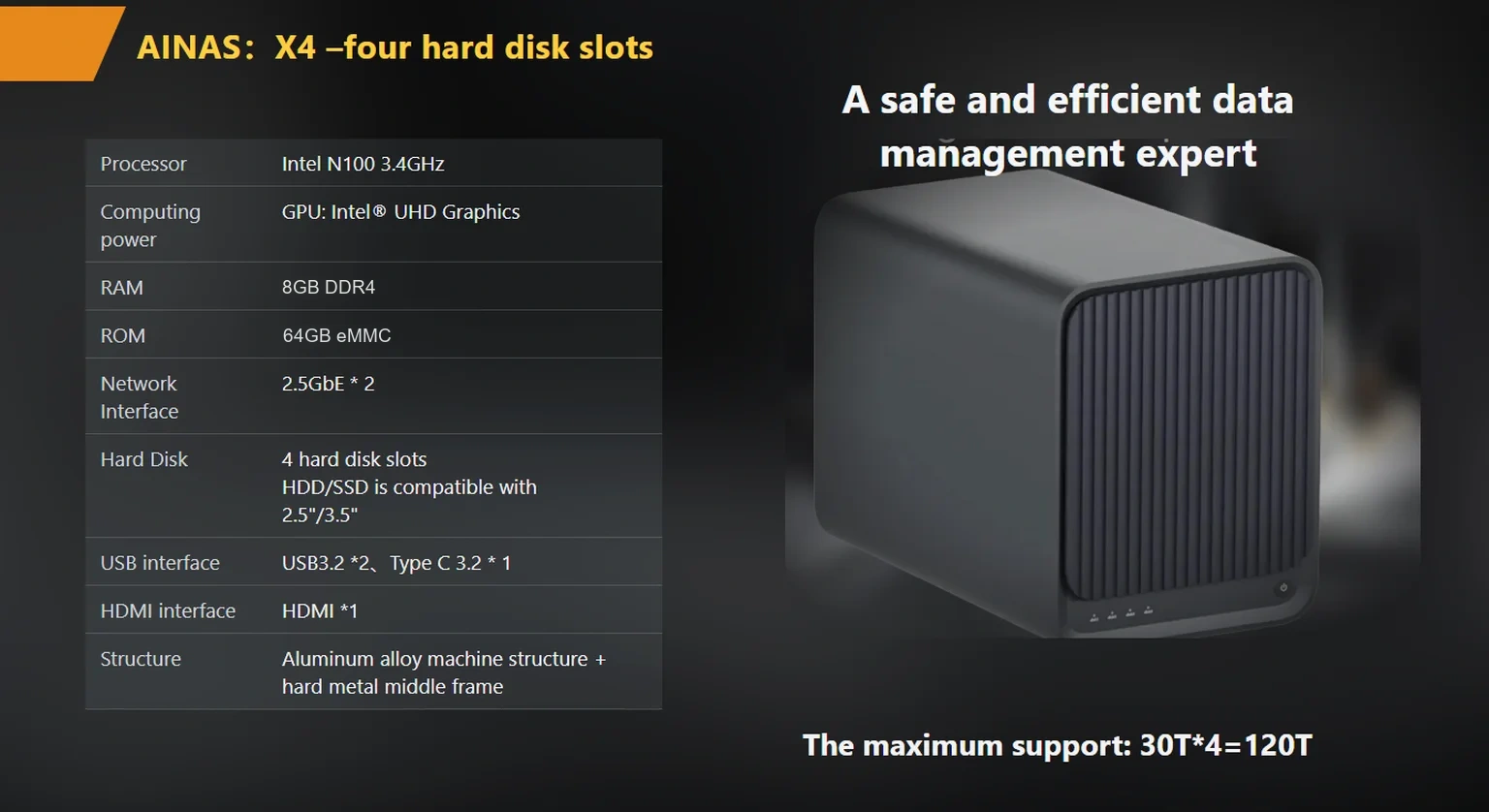
The published specification of the woCyber X4 lists an Intel N100 processor, 8 GB of DDR4 memory, and containerized application support. That is the class of hardware this article is about: a desktop appliance with four drive bays and a CPU that also has a day job serving files. On this class of platform, a quantized 7B or 8B model is the sensible ceiling, and even then the model shares memory with the storage services.
One structural fact helps. The model weights sit on the same local disk as your data, and inference runs on the same local processor. Nothing leaves the box unless you point the application at an external service.
Four things. Miss any of them and the pilot stalls in week one.
The formula is short. Usable memory = total RAM − operating system and file services − model file − context buffer. The context buffer (the working memory a model needs to hold your prompt and its own draft while answering) grows with how much text you feed it, so leave headroom.
Worked example on an 8 GB unit. Set aside memory for the operating system and file services first; on a lean build that can sit near 2 GB as an illustrative estimate, on a busier one noticeably more, and your own monitoring will tell you the real number. The remainder, call it around 6 GB on a lean build, has to hold a 4.9 GB quantized 8B model plus its context buffer. That fits on paper and breathes badly in practice. On a 16 GB configuration the same model leaves more than 9 GB free, which is comfortable.
A practical rule for these pilots: Treat any model file above half of usable RAM as a red flag. Caching, context, and the storage job all draw from the same pool, and the failure mode is not a crash. It is slow answers at 9 a.m. when the backup window overlaps with the finance team’s month-end exports.
The table below uses approximate quantized file sizes from public GGUF model cards on Hugging Face (checked November 5, 2026). Treat the file sizes as planning figures, not quotes.
| Model class | Quantized file size (approx.) | Fits an 8-16 GB NAS? | Realistic use |
|---|---|---|---|
| 3-4B | ~2–3 GB | Yes, on 8 GB | Summaries, drafts, simple Q&A |
| 7-8B | ~4–5 GB | Tight on 8 GB, comfortable on 16 GB | Internal assistant, document Q&A |
| 13-14B | ~8-9 GB | 16 GB only | Better reasoning, slower on CPU-class hardware (a qualitative judgment, not a benchmark) |
| 30B and up | ~18 GB and up | No | GPU server territory |
Read the table as a budget rule. The jump from “fits” to “useful” happens inside the 7-8B class for most internal workloads. The jump from “useful” to “fast” happens on hardware this article does not cover, and that second jump is where budgets usually break.
The practical route in 2026 runs through three projects. Ollama wraps model downloads and serving behind one command line. llama.cpp runs the quantized formats directly and is the engine under many wrappers. Hugging Face documents the GGUF format (a single-file quantized model container) that both consume. All three are documented publicly: see the GGUF format documentation on Hugging Face, the Ollama project repository, and the llama.cpp project repository.
On hardware with containerized application support, the sequence is short. Install the runtime, pull a quantized model, bind the service to the local network interface, and point your internal tool at it. Keep the model and the data on the same box and the whole loop stays local. Write down which telemetry settings you disabled, because a “local” deployment that phones home is not local.
Consider a hypothetical 15-person consultancy. They pilot a document Q&A assistant on their existing storage appliance. One user at a time, 8B model, one user gets an answer fast enough in this illustrative scenario. The pilot works. Then the roadmap says all 15 staff should query it during billable hours, with the model reading 50-page briefs. Two things break: the memory budget, and the patience budget, because CPU inference serves one heavy request at a time.
The signals are concrete: more than three or four concurrent users, models in the 30B class, fine-tuning instead of inference, embedding jobs that chew through the whole document archive nightly. Any one of them points at a machine with a discrete GPU, and no amount of NAS tuning changes that.
If the pilot only needs one user at a time, start with the hardware you already own. If the roadmap already mentions parallel users, spec the GPU box from day one. Buying the small machine twice costs more than buying the right one once.
If you are evaluating appliances for this dual role, the memory line deserves most of your attention. The published specification of the products/x4-nas-server“>woCyber X4 lists 8 GB of DDR4, and the same document describes an OEM path to 16 GB. Teams researching how to deploy LLM on NAS hardware should treat that option as the decision point: at 8 GB you host a model and hope the file jobs stay polite, at 16 GB the pilot survives growth. The same published specification lists an Intel N100 processor and containerized application support, which is the combination the table above assumes.
woCyber is an export brand of a Beijing-based storage manufacturer, with research and development in Beijing and mass-production manufacturing in Shenzhen. For a fuller hardware checklist before you commit, see ai-ready-nas-hardware-requirements“>AI-ready NAS hardware requirements. And if the goal is an appliance you will sell under your own brand rather than deploy internally, the on-premises-llm-nas-oem“>on-premises LLM NAS OEM sourcing guide covers the OEM questions to ask. Verify the memory option and the container support in writing before you sign anything, because those two lines decide whether the pilot survives contact with real users.

Can any NAS run an LLM?
No. Useful deployments start at 8 GB of RAM, container support, and storage headroom for multi-gigabyte model files. ARM-based compact units with 1 to 4 GB of memory can run tiny utility models, but a workable 7-8B assistant needs the larger envelope.
How much RAM is needed to deploy LLM on NAS hardware?
Plan on 8 GB as the working minimum for a quantized 7-8B model, and 16 GB for a comfortable deployment where the box also serves files. The model file, the context buffer, and the storage services all share the same pool.
Do I need a GPU on the NAS?
Not for small models and few users. CPU inference on a low-power desktop platform is slower but workable for one user at a time. A discrete GPU matters once you serve several concurrent users or run 30B-class models.
Which models are sensible starting points?
Quantized 7-8B models in GGUF format, pulled from public model cards, are the usual entry point for internal assistants. Check the model card for file size and license before you commit, and re-check it at deployment time because quantized builds get updated.
Does the data stay on the NAS?
It can. If the model weights are stored locally and the application makes no external API calls, the question and the answer both stay on the box. Verify the runtime’s telemetry settings and disable anything that contacts an external service.

Tell us your application, capacity target and deployment scenario — our engineers return a configuration proposal with tiered pricing within one working day.
Vendors quote private cloud storage in five different ways, and the quotes rarely compare line for line. The hardware quote excludes drives.…
November 4, 2026Network attached storage vs direct attached storage comes down to who needs the data. Direct attached storage (DAS) ties drives to one…
November 4, 2026NVR storage capacity is the total drive space a network video recorder needs to hold footage from every camera over a chosen…
Ask our export team for the OEM/ODM cooperation guide and a written quotation.
