Leo · 2026-10
An AI NAS backup system is a storage appliance that keeps versioned or scheduled copies of a company’s data on hardware the company controls, and adds on-device processing — classification, indexing or anomaly detection — so that the copies stay searchable and verifiable without a cloud round trip. For an OEM buyer, the specification question is not which platform is fastest; it is how many restore paths survive a single fault.

The buyer problem here is narrow. A US brand sourcing an AI-enabled backup appliance has to write a specification a factory can quote against and its own support team can honour for years. The failure that costs the most is not a slow appliance — it is a restore that could not be performed, discovered during an incident.
A restore path is a route from a surviving copy back to working data, and the NIST Cybersecurity Framework treats recovery as a function of its own. One appliance holding one copy has one path, and any failure of that appliance ends it. Counting the independent routes — a second on-site box, an offline copy, a hybrid copy held elsewhere — is the fastest way to see whether an AI NAS backup system is actually a backup system.
Counting restore paths is the test that separates a real AI NAS backup system from a chassis with a second drive in it, and the discipline is worth applying to the whole purchase, because marketing language hides path count rather than stating it.
For an AI NAS backup system the backup volume is the protected dataset size multiplied by the retention depth, then reduced by the change rate to give a realistic copy set — and the resulting figure has to fit under the platform ceiling with room for the copies that have not aged out yet.
Step one: the protected set. Add the file shares, application data and any structured data the business cannot rebuild. Break-even retention differs by data class, because a purchase order archive and a camera recording do not have the same useful life.
Step two: the effective copy set. If the platform keeps three versions of a 2 TB protected set, the working copy set starts near 6 TB before any space savings. Deduplication and compression reduce that figure, and the reduction is workload-dependent, so it has to be measured on a sample rather than assumed.
Step three: the ceiling test. Compare the working copy set against the platform’s capacity ceiling. This is where two-bay and four-bay decisions actually get made — not on the drive count, but on whether the copy set plus the working margin fits.
| Restore path | What it survives | What it does not survive | Reference configuration |
|---|---|---|---|
| Primary appliance array (RAID 0/1/5/6/10) | A single drive failure, depending on level | Deletion, file encryption, controller failure | X4 — RAID 0 / 1 / 5 / 6 / 10 |
| Second on-site copy | Appliance failure and accidental deletion | Site-wide fire, flood or theft | X4 — 4 bays to 120 TB |
| Offline or air-gapped copy | Ransomware encryption of network-reachable copies | Data loss discovered after the offline copy was overwritten | A copy the business holds off-site under its own policy |
| Hybrid copy held off-premises | Site loss, with a copy the business can retrieve | Cost of egress when the copy has to come back | Confirmed against the customer’s own off-site target |
| Archived recording with retention tiers | Review after an incident window has passed | Anything older than the retention setting | S1 — 7 / 14 / 30-day retention tiers |
Take a drawing-heavy office of about 45 staff, protecting 8 TB of drawings, project files and email archives, with four versions retained. Running on the four-bay platform, four 16 TB drives deliver 64 TB raw, and at RAID 5 that leaves roughly 48 TB usable — 32 TB of copies plus a 16 TB margin for growth and for versions that have not expired yet. Had the same firm chosen two bays, the raw ceiling would have been the constraint rather than the drive count. Note what the arithmetic did not do: it did not compare a subscription price against a purchase price. Those are different cost structures, and the recurring metered rates are the buyer’s own to apply.

Three processing capabilities belong in the specification for an AI NAS backup system because each one changes a recovery procedure rather than adding a convenience: on-device classification, on-device indexing, and local inference that runs without network access.
Classification that runs on the device. The S1 AiNAS security kit performs person, vehicle and pet classification on-device with a false-alarm rate below 3%, using a PoE IP camera feed over ONVIF and running 100% of the computation locally. For a backup appliance that also ingests camera footage, that processing is what keeps the footage searchable without shipping it to a third party.
Indexing that stays on the box. A searchable index is what turns a copy set into something a recovery team can use under time pressure. The index has to be stored locally so the copy can remain offline.
Inference with no network dependency. When a local model runs on the appliance, a query against the archive does not require an outbound connection. That single property is what makes an offline copy usable as an archive rather than as a cold file dump — and it is the property that buyers who are leaving a subscription plan are usually shopping for.
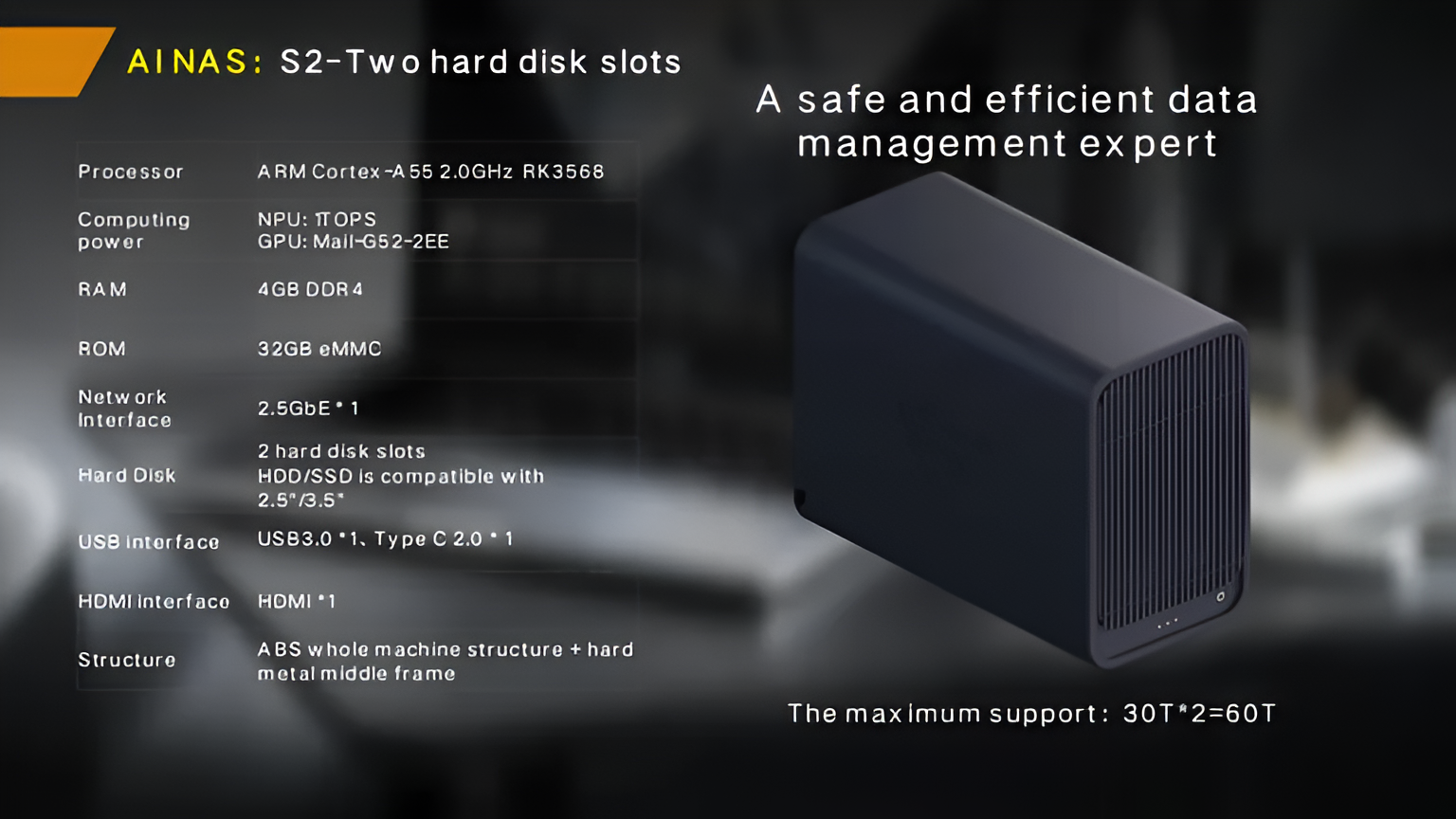
Capacity for that processing comes from published hardware in the woCyber range. The X4 runs an Intel N100 processor with hardware 4K transcoding and container support, up to 16 GB DDR4 under the OEM configuration, up to 120 TB across four bays, and two 2.5GbE ports aggregating to 5 Gbps. The S2 pairs an RK3568 processor and a 1 TOPS NPU with 32 GB eMMC, 60 TB and one 2.5GbE port. For the four-bay configuration in full, products/x4-nas-server carries the platform detail, and the wider products range shows where the two-bay and one-bay options sit.
An AI NAS backup system should be tested against four named scenarios — a failed drive, an accidental mass deletion, a file-encrypting attack, and a site-level loss — because each one is answered by a different mechanism, and a specification that only answers the first is not a backup design.
US federal guidance reaches the same conclusion: the CISA ransomware guide advises maintaining offline, encrypted backups and testing recovery, which is exactly what an offline copy answers. There is also a hardware angle that is easy to miss. A backup appliance runs unattended for years, so the parts that fail quietly are the ones that decide the outcome: the boot volume, which must survive repeated firmware updates, and the cooling path on a chassis that is never turned off. On the four-bay platform the boot volume is 64 GB eMMC with an OEM option to 128 GB, and active multi-fan thermal control runs automatically.

Compare AI NAS backup systems on four lines before the unit price: the capacity ceiling with the RAID level stated, the boot storage option, the aggregated port bandwidth, and the per-batch documentation set. Each one changes the cost of ownership after purchase rather than the cost at purchase.
Comparing AI NAS backup systems on ceilings rather than on unit price is the sharper test, because two quotations can name the same drive count while offering different ceilings, and a ceiling that is reached in year two forces an early replacement. On the platform described here, the four-bay configuration reaches 120 TB with dual 2.5GbE ports aggregating to 5 Gbps, the OEM configuration list works from the options a project requests at the start, and container support covers services that grow after deployment.
Then check the supply side, because the appliance must be replaceable and extendable years after the order. The platform minimum order quantity is a per-project minimum on a reconfiguration, and a quoted threshold where a new PCB respin or mould is required. Tooling can be amortized into the unit price or invoiced separately, with ownership transferring once paid in full. Certification covers CE, UKCA, FCC, RoHS, REACH and WEEE. Volume pricing and warranty terms sit in the quotation and order documents rather than in a published table.
Buyers routinely compare backup appliances on capacity per dollar and settle on the cheapest configuration that fits today’s dataset, while the clause that decides whether the purchase was good value gets written years later, during the first restore performed under pressure. Specifying the number of independent restore paths is a design decision; fitting the dataset is arithmetic.
For AI NAS backup systems the overlap is capacity and processing; the boundary is the retention policy. Both workloads consume bays and both benefit from on-device processing, but camera footage is replaced on a fixed schedule while business files are kept indefinitely, and mixing the two on one appliance without separating the retention settings is where deployments go wrong.
Where an OEM buyer expects both, the split is by retention class rather than by device. Camera recording lands on a 7, 14 or 30-day tier with automatic expiry, sized from camera count and recording profile. Business data lands on a versioned copy set with policy-driven retention. One appliance can carry both — but the retention clocks must be configured separately, or the footage tier quietly consumes the archive space. For camera estates, the same platform decision applies but with a retention clock attached to it.
Seven clauses belong in the agreement: the platform specification with ceilings, the OEM branding layers, the documentation set per batch, the tooling ownership transfer, the firmware change-control path, the sample credit arrangement, and the retention and expiry policy. Together they fix what the buyer owns and what the factory may change.
Write the specification clause with the ceilings rather than the shipped configuration, because the ceiling is what survives a firmware release. Write the branding clause to list each layer the buyer controls — a white-label mobile app, a branded user interface and boot animation, logo by silkscreen or laser engraving — with naming, packaging and documentation localized. Write the documentation clause to name CE, UKCA, FCC, RoHS, REACH and WEEE and the listing inputs: EAN or UPC coding, energy and compliance labelling, WEEE and producer-responsibility marking, and country-of-origin marking.
Setting those seven out before engineering starts is what keeps the appliance a product the buyer owns rather than a product the buyer resells.
A two-bay appliance is enough when the protected set is small and the retention depth is short, because the copy set plus a growth margin has to fit under the bay and capacity ceiling. Where several versions of a large dataset are kept, the four-bay configuration is the one that reaches 120 TB without replacing the chassis.
A neural processing unit runs classification and inference locally instead of in a cloud service. The S2 pairs an RK3568 processor with a 1 TOPS NPU, and the S1 performs person, vehicle and pet classification on-device with a false-alarm rate below 3%, keeping computation local rather than sending footage or documents out.
Usable capacity depends on the level: as an illustrative example, four 30 TB drives give 120 TB raw, about 90 TB usable at RAID 5 and about 60 TB usable at RAID 6. Set the level from the rebuild time the business can accept, then test whether the working copy set fits inside what remains.
It can, and separating the retention clocks is what makes it work. Camera recording runs on a 7, 14 or 30-day tier with automatic expiry, while business data runs on a versioned copy set with policy-driven retention. Without separate settings the footage tier consumes the archive space.
The platform minimum order quantity is a per-project minimum where an existing platform is reconfigured, and a quoted threshold where a new PCB respin or new mould is required. Samples are charged at the published single-unit rate and credited in full against the first production order.
Each batch ships with the CE, UKCA, FCC, RoHS, REACH and WEEE documentation the buyer needs to list the product. EAN or UPC coding, energy and compliance labelling, WEEE and producer-responsibility marking, and country-of-origin marking are supported as listing inputs.
Tell us your application, capacity target and deployment scenario — our engineers return a configuration proposal with tiered pricing within one working day.
Key takeaways An FCC-recognized lab must hold the right scope for your device's rule part, not just any accreditation. A 2-bay NAS…
November 3, 2026Shared storage for deskside AI clusters refers to a storage appliance on the office LAN that holds datasets, checkpoints and embeddings for…
November 3, 2026A cloud storage subscription cost is the recurring fee a business pays to keep its files on a provider's servers, billed per…
Ask our export team for the OEM/ODM cooperation guide and a written quotation.
