Leo · 2026-11
A NAS backup strategy for business rests on three pillars in 2026: a copy that is separate from the primary array, a restore procedure you have actually tested, and a backup window that fits your network. RAID protects against a failed drive; only a separate copy protects against deletion, encryption, or a failed site. This guide turns those pillars into numbers a small business can plan with.

Most businesses that lose data owned a NAS. The failure is rarely hardware — it is the assumption that a redundant array is a backup. The sections below separate the two, size the backup window, and lay out a scenario a 30-person office can reuse.
RAID answers one question: what happens when a drive fails. A parity array rebuilds onto a replacement disk, and business continues. RAID does not answer deletion, ransomware encryption, or controller failure — all three propagate instantly to every copy inside the array, because every copy is the same logical volume. The Berkeley papers that defined RAID are explicit about the scope: redundancy buys availability, not recoverability from hostile or accidental state changes.
The working rule: if the damage can reach the file system, it reaches the array. Only a copy on separate hardware, separate credentials, or separate media survives it.
The classic pattern — three copies, two media types, one off-site — maps onto a NAS deployment as follows:
The NIST contingency planning guide gives the standard structure for recovery objectives and test schedules; businesses without a formal plan can borrow its worksheet categories directly.
Backup windows are network problems before they are storage problems. As planning assumptions (not measured benchmarks): a 1 GbE link moves roughly 118 MB/s of file data; a 2.5GbE link roughly 295 MB/s.
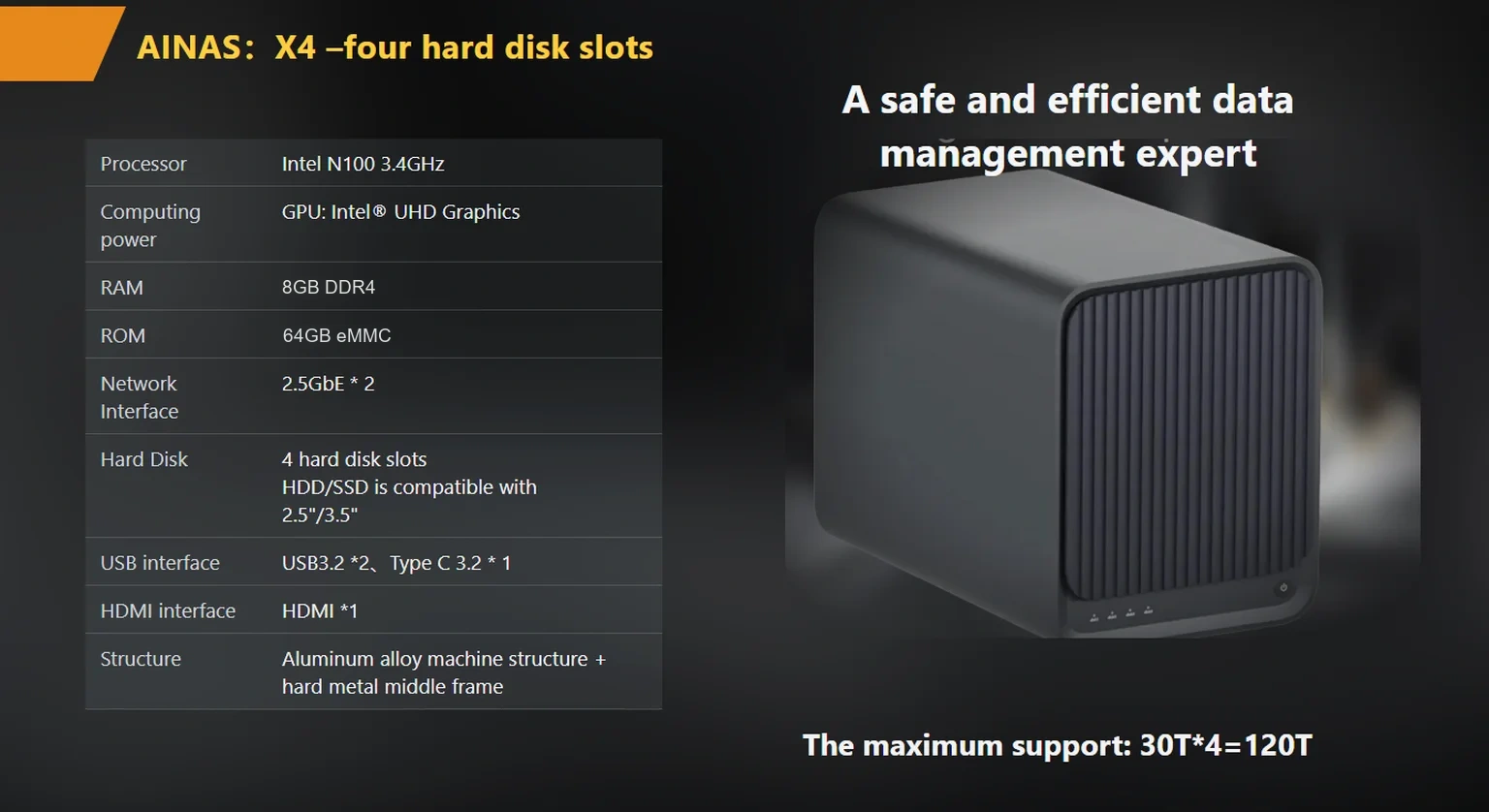
Worked example (illustrative): the nightly backup set is 2 TB, or about 2.1 million MB. Over gigabit: 2,100,000 ÷ 118 ≈ 17,800 seconds ≈ 4.9 hours. Over 2.5GbE: 2,100,000 ÷ 295 ≈ 7,100 seconds ≈ 2.0 hours. If the office quiet period is four hours, gigabit misses the window and 2.5GbE fits with margin. The published X4 specification lists two 2.5GbE ports with 802.3ad aggregation up to 5 Gbps, which is the headroom that absorbs a backup colliding with late work sessions.
Incremental backups change the daily math but not the baseline: the first full backup always runs at the raw rate, and restore tests — the ones you actually perform — run at the raw rate too. Plan hardware for the full-copy rate, not the average day.
A backup that has never been restored is a hypothesis. The test that counts is narrow and repeatable:
The timing record matters as much as the pass record: restore speed decides how long the business runs without data, and that duration is the number a continuity plan is built around.
| Property | Primary RAID array | Second copy (same site) | Off-site or immutable copy |
|---|---|---|---|
| Survives drive failure | Yes | Yes | Yes |
| Survives accidental deletion | No | Yes, to the backup age | Yes, to the backup age |
| Survives ransomware encryption | No | Yes, if credentials are separate | Yes, if credentials are separate |
| Survives site event | No | No | Yes |
| Restore speed | Immediate | LAN speed | Link speed; slowest of the three |
Consider an illustrative office: 30 staff, 8 TB of active files on a four-bay NAS, one quiet period between 22:00 and 03:00. The firm sizes its backup strategy as follows: the primary array runs RAID 6 across four drives, tolerating two simultaneous failures; a second four-bay unit in the same building receives a nightly incremental; a removable drive set goes into a fire safe weekly. The trade-off the firm accepts: the off-site copy is a week old, so documents created since the last rotation have only two copies. The firm prices that risk explicitly — the documents that would hurt most are rotated twice weekly instead. The lesson: a NAS backup strategy for business is a set of explicit age-and-cost decisions, not a single checkbox.
woCyber publishes the X4 at a reference price of $400 per unit (USD, excluding shipping and tariffs), with volume and OEM pricing quoted on request at a published MOQ of 100 units per SKU. The company has shipped 500K+ units over 15+ years, with research and development in Beijing and mass production in Shenzhen; products are certified CE, UKCA, FCC, RoHS, REACH, and WEEE.
A strategy that tries to protect everything equally protects nothing well. Rank the estate into three tiers before any hardware purchase. Tier one is the data the business cannot retype: contracts, books of record, transaction history. It earns the fastest schedule, the deepest version history, and a place in the off-site copy. Tier two is data that is expensive to recreate but not impossible: shared project folders, design assets, scanned archives. It earns daily incrementals and a weekly full. Tier three is convenience data — downloads, old exports, personal files — which earns a copy with no retention promises at all.
The tiering pass pays twice. It shrinks the backup window, because tier-one sets are small enough to copy inside even a gigabit window, and it sizes the second device correctly, because the expensive drives go where tier one lives. Businesses that skip the pass buy one large appliance, copy everything nightly, and discover during the first real restore that the documents they needed were in the one folder excluded for time.
Ransomware that reaches a NAS typically arrives through an endpoint with mapped drives, then encrypts what the endpoint can see. The countermeasure is architectural: the second copy must not be permanently mounted as a share on user machines, and the off-site copy must not share credentials with the primary. A second NAS that receives backups over a dedicated account, holding no interactive user sessions, cannot be encrypted by a desktop that has never seen it. The same logic favors removable media for the smallest sites — a rotated drive in a safe cannot be reached from any endpoint by definition.
Versioning completes the posture. A backup target that keeps prior versions for a set window means an encryption event that lands in the nightly incremental still has a clean version to restore from — one window older. When comparing hardware, ask which versioning or snapshot features are included, how they are scheduled, and who can delete a snapshot; the last answer matters more than the first, because a snapshot an intruder-admin can delete is storage, not protection.

Isn’t RAID 6 enough for a small business? RAID 6 tolerates two drive failures. It does not survive deletion or encryption, both of which are the more common loss events in practice.
How often should backups run? Daily incrementals with a weekly full copy is a common baseline. The right frequency comes from how much work your business can afford to retype, which is a business answer, not a technical one.
What is an immutable backup? A copy that cannot be altered or deleted for a set period, even by an administrator. It is the strongest defense against ransomware reaching your backups.
Should backups compress? Compression saves capacity and costs restore time. For archives that are rarely restored, compress; for the copies you restore most often, store raw.
Do I need the same RAID on the backup NAS? No. The backup copy exists for recoverability, and any protected layout works. Match drive capacity and leave headroom.

Write down the three copies, the window arithmetic, and the restore test schedule — then buy hardware that fits the numbers, not the other way around. The guides below cover the network and drive sides of the same plan.
raid-is-not-backup-3-2-1-plan-small-business-storage
small-office-nas-backup-window-test-2-5gbe-vs-1gbe
choosing-drives-for-business-nas-spec-sheet
X4 delivers Intel N100 performance, dual 2.5GbE with link aggregation up to 5 Gbps, RAID 0/1/5/6/10 and up to 120 TB — built for integrators and commercial deployments.
 Browse all platforms →
An off-grid security camera with local storage records onto hardware at the site, powered by the site's own supply, with no cloud…
November 20, 2026A security camera system without monthly fees records to storage you own, on hardware that processes video locally, instead of uploading clips…
November 20, 2026PoE cameras win on power stability, bandwidth certainty, and independence from your Wi-Fi; WiFi cameras win on install speed where running cable…
Ask our export team for the OEM/ODM cooperation guide and a written quotation.
